Research by Itamar Medyoni & CyOps Research Labs
Ransomware has moved far beyond opportunistic encryption. Today’s most disruptive operators conduct hands-on intrusions, steal data before impact, disable security controls, destroy recovery paths, and deploy custom-built encryptors designed to evade traditional defenses. Settra is a clear example of this evolution.
Ransomware operations in 2026 have evolved into disciplined, multi-layered enterprise shakedowns. Threat actors no longer rely on noisy, uncoordinated commodity malware; instead, they operate surgical, staged intrusions designed to extract terabytes of sensitive data, dismantle defenses, wipe forensic artifacts, and deploy custom-armored lockers that leave organizations paralyzed.
Settra represents the leading edge of this threat landscape. First identified in June 2026, the group scaled with alarming speed, posting dozens of high-profile commercial victims to its Tor leak blog while conducting private negotiations over Tox and darknet chat portals. While initial public reporting cataloged Settra’s extortion portal and intrusion artifacts, the core Windows encryptor remained an unanalyzed black box—shielded behind custom encryption and operator-held passwords.
During an active Incident Response investigation, Cynet Research Labs broke that barrier. Through 100% offline static reverse engineering, Cynet’s researchers successfully defeated Settra’s outer defense layers, extracted its proprietary decryption algorithms, recovered the inner Windows x64 payload, and reconstructed the entire execution model from operator launch to disk encryption.
Our analysis revealed an encryptor engineered specifically for maximum operational lethality:
Crucially, this deep dive demonstrates why legacy endpoint controls fail against modern ransomware. Settra’s dropper is custom-packed, unsigned, and dead-on-arrival without a specific command-line password—rendering traditional sandbox execution and signature-based AV completely ineffective. In contrast, Cynet’s multi-layered endpoint protection platform detects and terminates the threat instantaneously. Operating at the kernel driver layer, Cynet’s behavioral heuristics and decoy file traps detect unauthorized file modifications the moment Settra attempts to touch the filesystem, executing automated remediation (killing the malicious process within one second) and ensuring complete host resiliency.
Settra intrusions follow a calculated, hands-on-keyboard methodology characteristic of modern Ransomware-as-a-Service (RaaS) operations. Threat actors gain initial access primarily through valid credentials obtained from infostealer marketplaces or compromised VPN gateways.
Once inside the perimeter, the operators conduct low-and-slow reconnaissance using dual-use network scanners (such as NetExec), extract credentials via LSASS memory dumping (Mimikatz / ProcDump), and establish durable command-and-control using remote management software such as Mesh Agent. To clear the runway for encryption, attackers deploy edr_blind utilities and weaponize known vulnerable drivers—specifically signed drivers from Safetica’s STProcessMonitor family (STProcessMonitor_v114.sys)—to terminate security software from Ring-0 via Bring Your Own Vulnerable Driver (BYOVD) primitives.
Only after data exfiltration is complete and local defenses are impaired do the operators deliver the Windows encryptor (win64.exe).
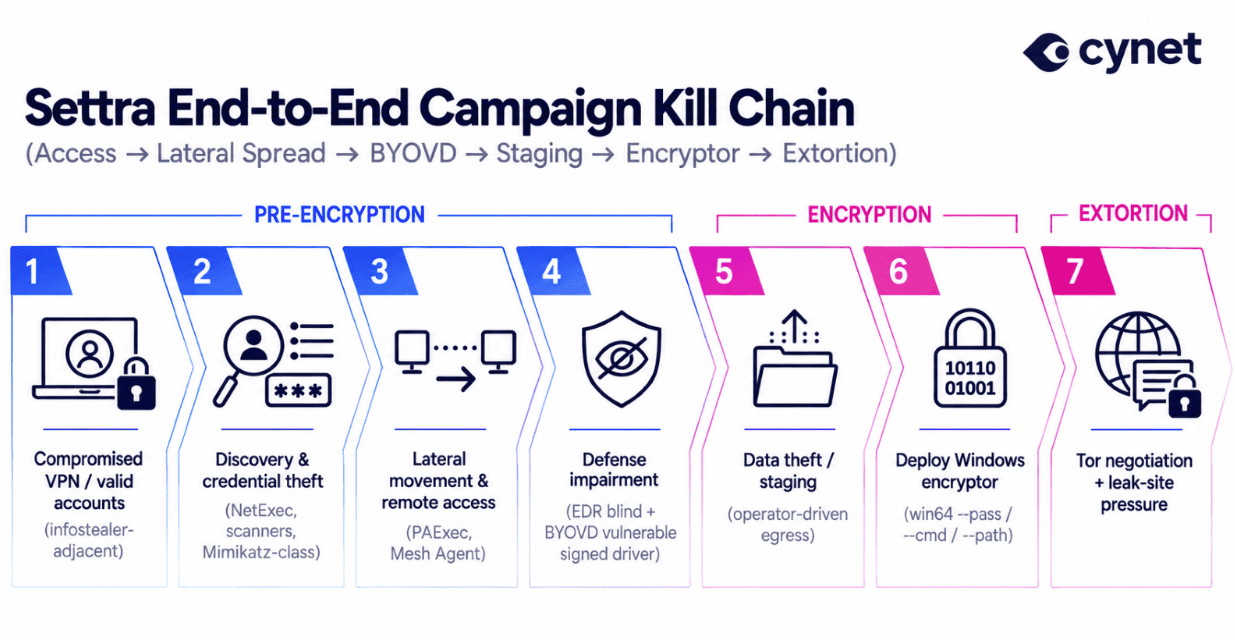
Figure 1: Settra End-to-End Campaign Kill Chain (Access → Lateral Spread → BYOVD → Staging → Encryptor → Extortion)
When Settra executes on an unprotected endpoint, it transforms the target environment into an unmistakable extortion showcase.
Wallpaper Hijack
Settra drops a high-resolution branded warning graphic to C:\Users\Public\NOTICE.png. The implant immediately forces this graphic as the active desktop background by calling SystemParametersInfoA(SPI_SETDESKWALLPAPER) and configuring registry keys under HKCU\Control Panel\Desktop (Wallpaper, WallpaperStyle, TileWallpaper). The notice instructs victims that their files have been encrypted, directs them to RESTORE_FILES.txt, and warns against altering file extensions or attempting third-party decryption.
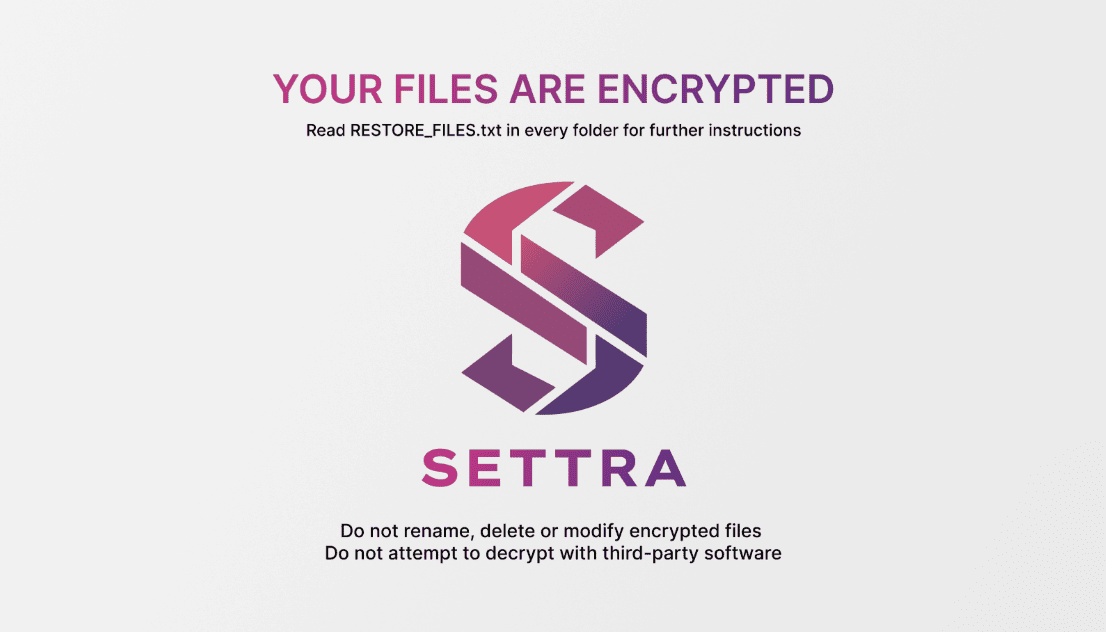
Figure 2: Extracted Settra Ransomware Desktop Notice Wallpaper (C:\Users\Public\NOTICE.png)
Settra preserves the original filename while appending the .locked extension (e.g., financial_records.xlsx becomes financial_records.xlsx.locked). To maintain operational state during multi-threaded encryption, the malware writes to an intermediate temporary extension—*.locked_wip—before executing an atomic MoveFileEx rename upon completion. If a file already possesses the .locked extension, it is skipped.
Settra drops dual ransom notes (RESTORE_FILES.txt and RESTORE_FILES.html) in every enumerated directory. The note emphasizes data theft, internal infrastructure compromise, and threatens public disclosure of proprietary corporate information on the group’s Tor blog if negotiations are refused.
By the time you read this message, you have already encountered not a malfunction, but the consequences of a targeted impact on your company's internal infrastructure

Before encrypting your company, we uploaded a large volume of your corporate data.
Systems are unavailable
Files are encrypted
Backups are encrypted or destroyed


        INSTRUCTION ON HOW TO CONTACT US. READ THIS MESSAGE IN FULL
Instructions for accessing the chat are in the last section.

        IMPORTANT FOR YOU
At this stage, the main threat is not only the consequences of the incident themselves, but also erroneous decisions made in the first hours. Attempts to act according to a standard emergency scenario, without understanding the full scale of the breach, almost always worsen the final damage.
Therefore:
... Do not rename, replace, or move files manually.
... Do not change the current state of the affected environment.
... Do not launch unverified recovery procedures.
... Do not delete files.
If you violate these rules, recovery of your infrastructure will be impossible.
From this moment on, the cost of every hasty action increases.
Every incorrect intervention reduces the room for recovery.
Every attempt to regain control blindly only creates new losses.
Preserve the current state of your infrastructure.

        WHAT HAPPENS NEXT
The present will determine not only the volume of technical damage, but also how deeply this incident will enter the operational, legal, and reputational history of your company.
We know what damage we have caused you by blocking and uploading data from your network, which is now being fully studied and prepared for publication and notification of your clients, employees, regulators, and all those who may sue your company if you ignore the dialogue and payment.
In this case, your losses will be catastrophic.

        WHY IT IS IMPORTANT FOR YOU TO START A DIALOGUE
By entering into dialogue with us, you will be able to save your money, and possibly even lose almost nothing.
We are not interested in destroying your business. Our goal is to receive fair compensation for maintaining the confidentiality of the extracted data, restoring control over your infrastructure, and providing a report on all vulnerabilities in your network to prevent future attacks on your company. We fully study the structure of your company and the uploaded data from your network for a reasonable demand.
Why do we carefully study the stolen data? If negotiations drag on or you refuse to pay, your data will be published on our blog with detailed information and the contents of your data.

        LINK BLOG
http://[CENSORED-SETTRA-ONION-SITE].onion/[REDACTED]

We are ready for any negotiations and always try to find a way to settle everything as quickly as possible so that the agreement suits both sides.

        NEGOTIATION RULES
Negotiations with us are conducted strictly in the chat. We do not contact you by email or by any other means, and we are not responsible if you pay someone through third-party communication platforms while ignoring the chat. You will be able to access this chat using the instructions provided below in this message. Ignore any attempts to start a dialogue by email or to redirect you to a fake chat. Such attempts will certainly be made against you after your name appears on our blog, if you ignore the negotiations.

        ADDITIONAL INSTRUCTION (if unable to contact)
If for some reason you are unable to contact us through the chat, on our blog in the information section our current contacts for direct communication will be indicated.

        CAUTION: RECOVERY COMPANIES
When working with recovery companies, be careful. They always try to hide information that will be published in the blog and in the dialogue. Most importantly, they hide the amount of our demand, which they always inflate for you in order to make additional profit from your problem. We recommend that you conduct the negotiations yourself in order to minimize the costs of downtime and reputational damage to your company. They are not interested in solving your problem if they cannot earn a large amount of money by negotiating with us.

        INSTRUCTION FOR ACCESSING THE CHAT
1. Install Tor Browser to access our chat:
https://www.torproject.org/download/

2. After installing Tor Browser, launch it and follow the link:
http://[CENSORED-SETTRA-ONION-SITE].onion/[REDACTED]
This is your personal room for negotiations with us.

3. Use this ID to log in:
[REDACTED-VICTIM-CHAT-ID]

The faster you respond to this message, the fewer potential losses and risks you will incur.
All reverse engineering was performed statically in an isolated research environment without executing live malware samples.
The recovered payload is a 64-bit Windows PE compiled with MinGW-w64 / GCC 16.1 (MSYS2), containing an asInvoker manifest and unpacking to ~3.01 MB in memory.
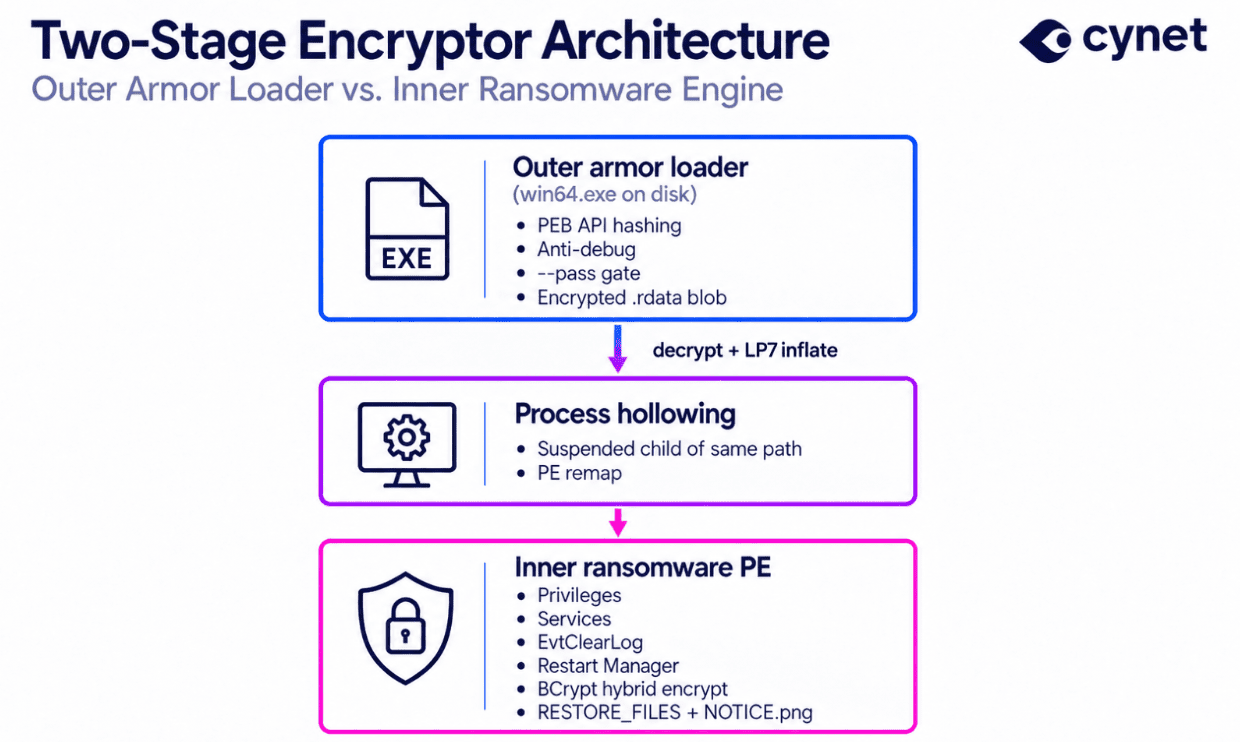
Figure 3: Two-Stage Encryptor Architecture (Outer Armor Loader vs. Inner Ransomware Engine)
Stage A — The Outer Defensive Packer
The dropped file (win64.exe) presents an impenetrable static profile: a minimal .text section, almost no conventional imports in its Import Address Table (IAT), and an encrypted 1.4 MB blob embedded in .rdata.
A1. PEB Dynamic API Hashing
The packer avoids static API imports by dynamically walking the Process Environment Block (PEB → Ldr → InMemoryOrderModuleList) to resolve kernel32.dll and ntdll.dll. Exported functions are resolved using a custom hashing algorithm based on djb2:
hash = hash × 33 + char (seed = 0x1505)
Through this mechanism, the loader dynamically obtains pointers to memory allocation, process creation, and thread context manipulation routines: VirtualAlloc, VirtualAllocEx, WriteProcessMemory, GetThreadContext, SetThreadContext, NtUnmapViewOfSection, CreateProcessA, and ExitProcess.
A2. Anti-Debug & Fail-Closed Gateways
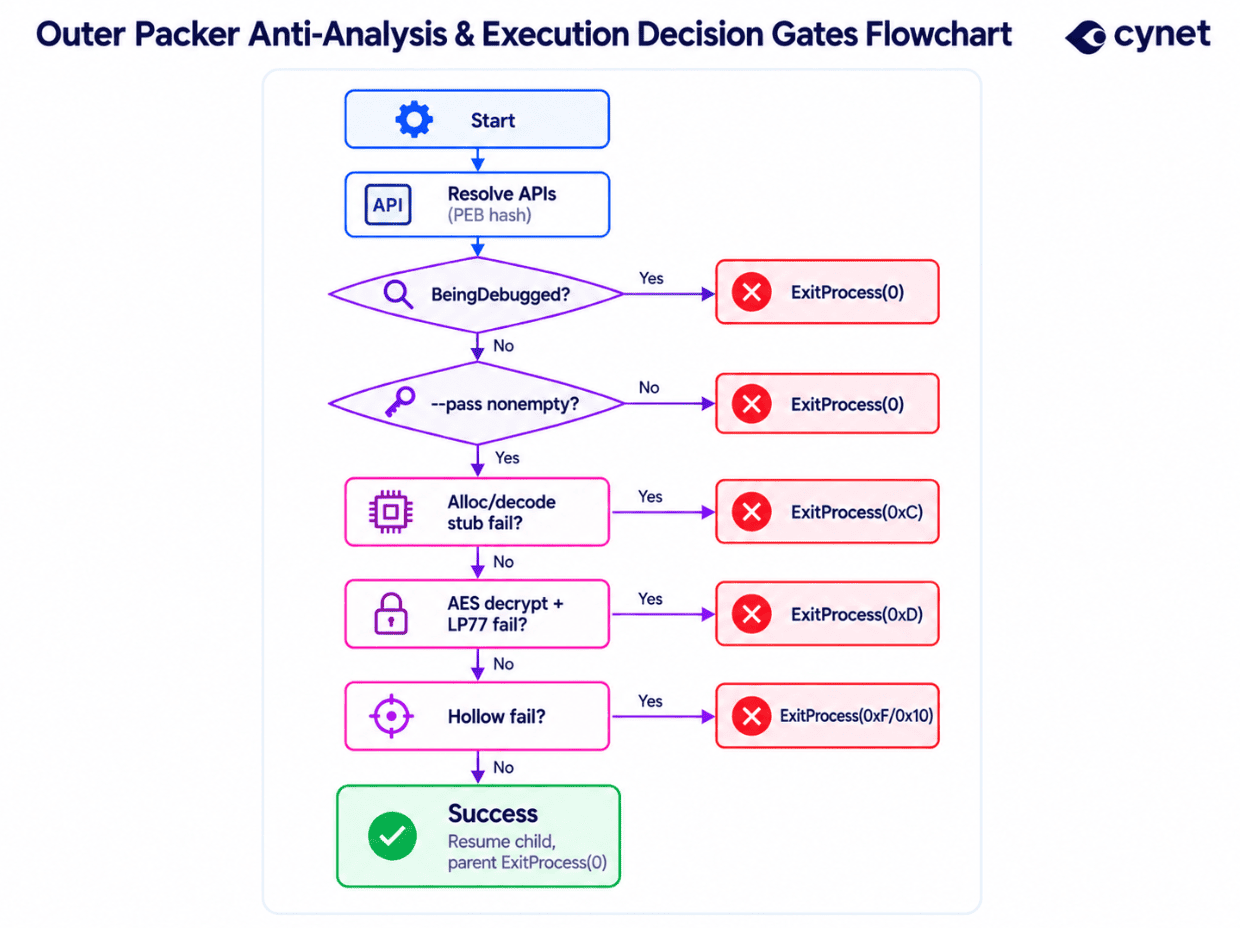
Figure 4: Outer Packer Anti-Analysis & Execution Decision Gates Flowchart
Settra implements strict fail-closed checks designed to thwart dynamic analysis in automated sandboxes:
Because exit code 0 is returned on debugger detection, missing parameters, and clean termination, automated sandboxes that simply execute binaries without parameters report benign status.
A3. Decryption & LP77 Decompression Pipeline
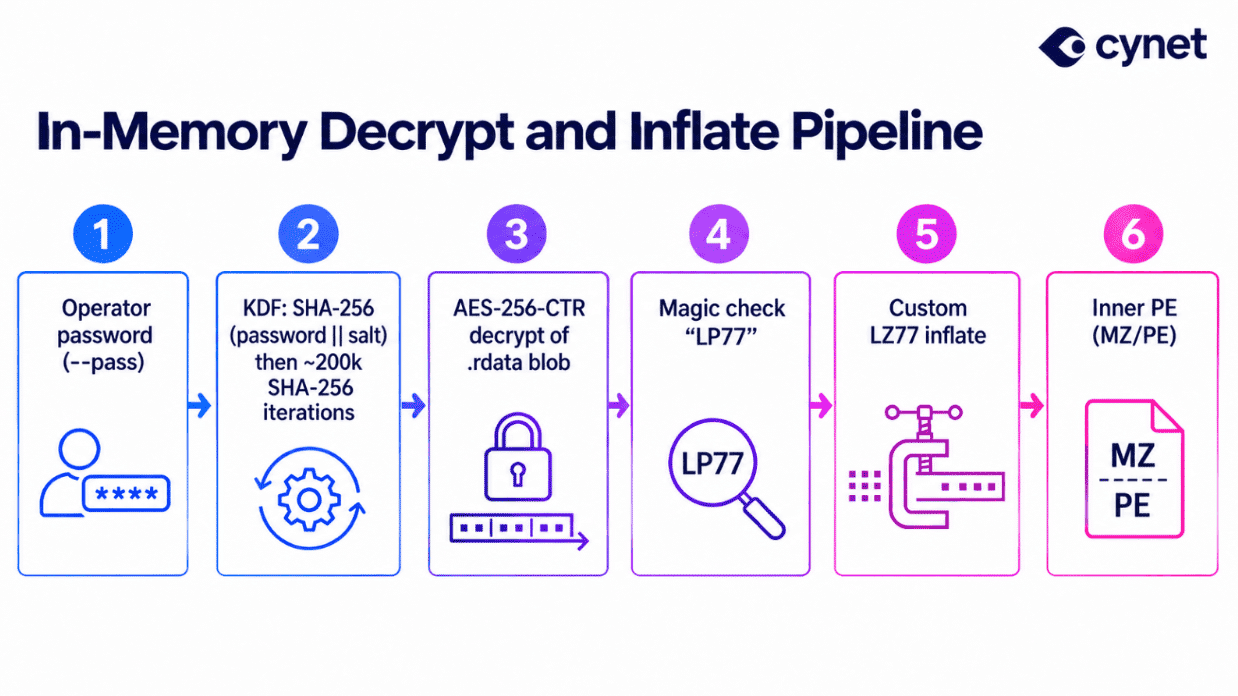
Figure 5: In-Memory Decrypt and Inflate Pipeline (KDF → AES-256-CTR → Custom LP77 Decompressor)
The operator-supplied password passed via –pass serves solely as a packer unlock secret; it does not decrypt victim files.
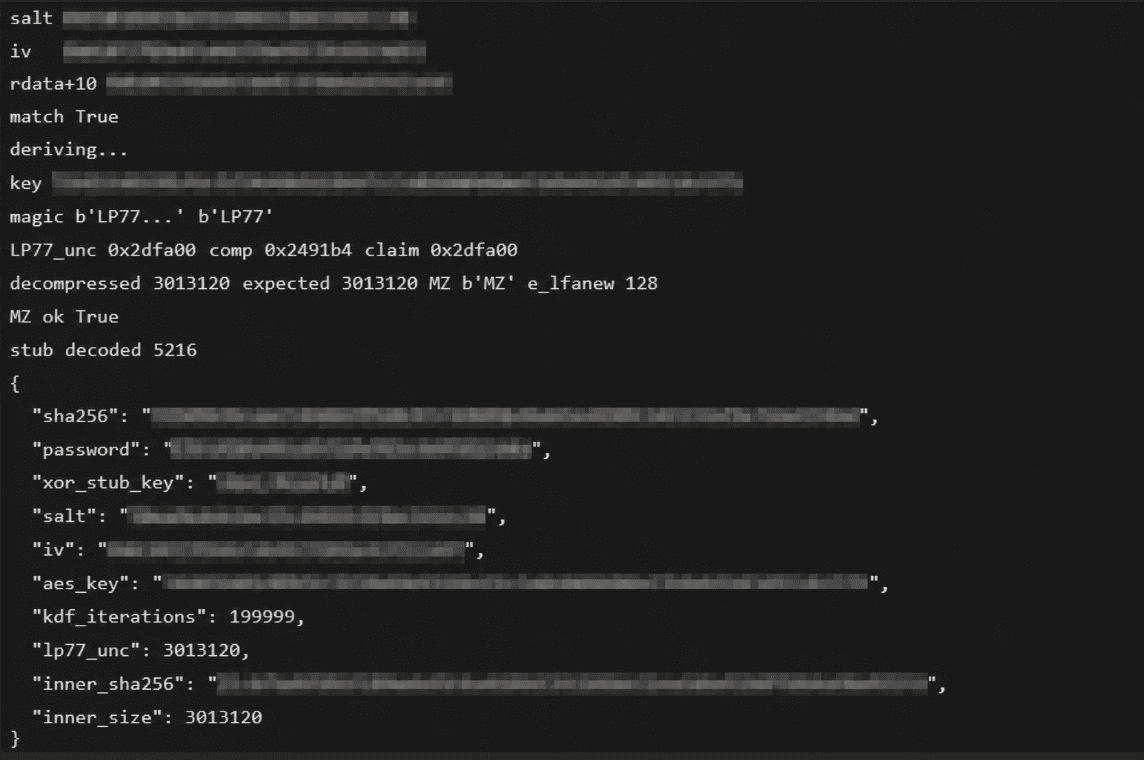
Figure 6: Static Decompression Verification: Decrypted Outer-Blob Revealing LP77 Header & Valid MZ/PE Signature
Cynet Research Labs successfully reconstructed Settra’s decompression routine, verifying the LP77 header and unpacking the complete inner executable.
A4. Process Hollowing Execution
Once the inner PE is fully reconstructed in memory:
Stage B — The Inner Ransomware Engine
The unpacked inner ransomware is a feature-rich, standalone encryptor. Rather than storing strings in plaintext, all operational parameters, service names, commands, and note templates in .data are obfuscated with individual single-byte XOR keys.
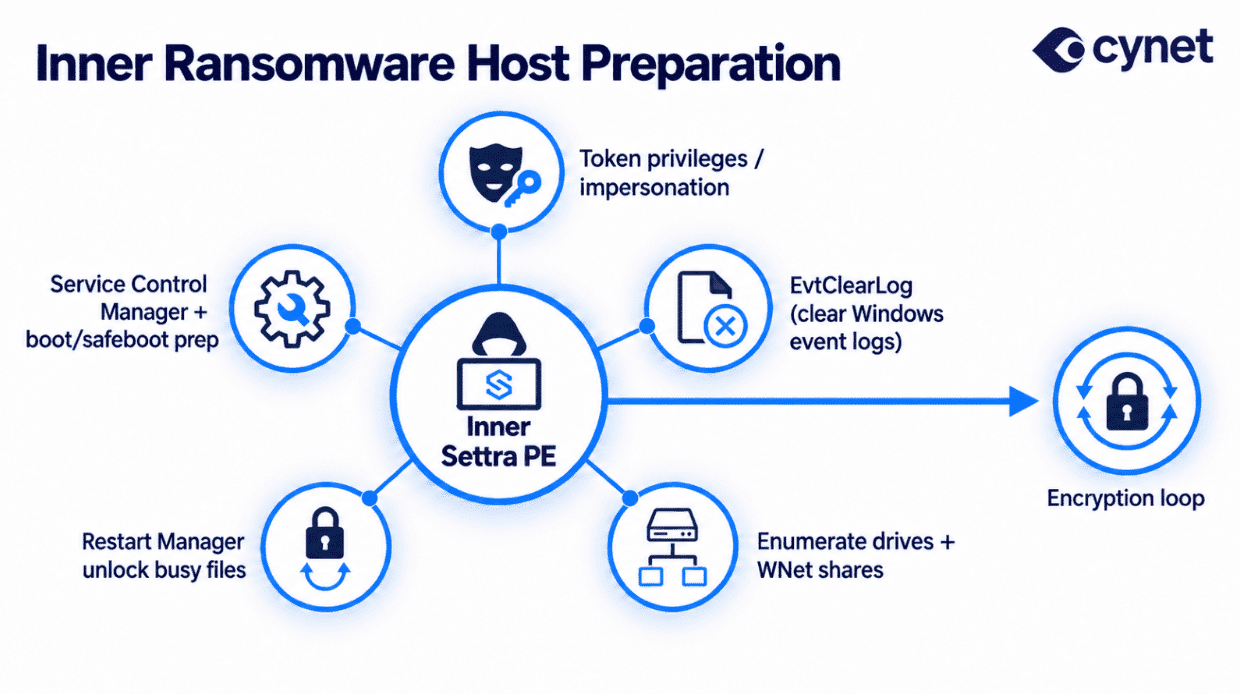
Figure 7: Inner Ransomware Host Preparation: Anti-Forensics, Recovery Destruction & Hyper-V VM Shutdown Architecture
B1. Hyper-V Virtual Machine Interception & Shutdown
In virtualized and server environments, virtual machines maintain continuous, exclusive write locks on their virtual hard disks (.vhdx, .vhd, .avhdx). A ransomware process attempting to encrypt these files while the guest OS is running will encounter OS sharing violations (ERROR_SHARING_VIOLATION), leaving the critical virtual hard disks untouched.
To eliminate this barrier, Settra includes a dedicated Hyper-V discovery and shutdown module:
SELECT * FROM Msvm_ComputerSystem WHERE Caption='Virtual Machine'
B2. Multi-Pronged Recovery Disablement
Settra systematically disables all built-in Windows disaster recovery and rollback features:
powershell -Command "Disable-ComputerRestore -Drive 'C:\'" >nul 2>&1
vssadmin resize shadowstorage /for=C: /on=C: /maxsize=401MB >nul 2>&1
By restricting shadow storage to 401 MB, Windows Volume Shadow Copy Service is forced to automatically purge all historical shadow copies to comply with the storage boundary, silently destroying restore points without generating standard shadow deletion alerts.
B3. 12-Step Anti-Forensics & Log Obliteration
To severely impede incident response and digital forensics, Settra executes a comprehensive 12-target log wiping sequence using wevtutil cl:
Beyond event logs, Settra obliterates secondary forensic artifacts:
B4. Restart Manager Process Unlocking
To encrypt files held open by database engines, office suites, and mail servers, Settra utilizes the native Windows Restart Manager API:
B5. Hybrid Cryptography Engine
Settra leverages the native Windows Cryptography API: Next Generation (CNG / BCrypt):
The encryptor binary contains only BCryptEncrypt—it does not import BCryptDecrypt and contains no private key material. File decryption is mathematically impossible without the threat actors’ offline private key.
Stage C — Data Theft vs. Encryption Separation
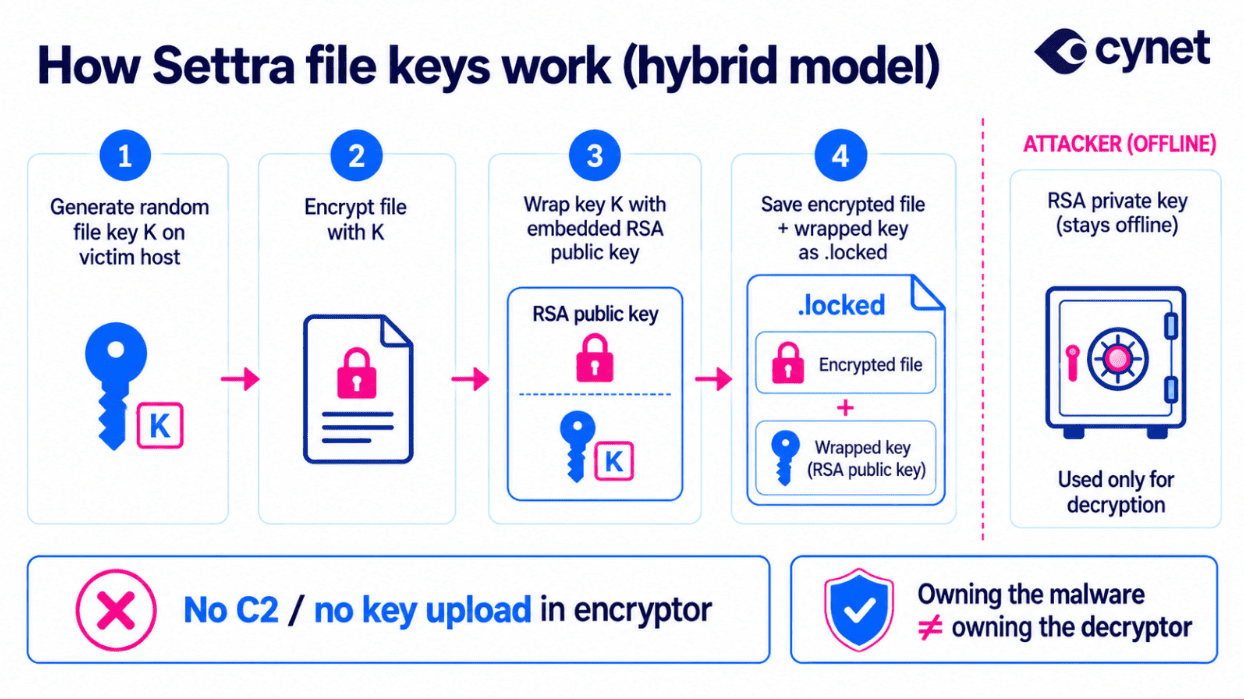
Figure 8: Operational Separation: Pre-Encryption Network Exfiltration vs. Strictly Local Destructive Encryption
In post-incident debriefs, organizations frequently ask whether the encryptor uploaded their files to the darknet. Static reverse engineering confirms that Settra’s encryptor contains no network exfiltration capabilities:
The ransom note’s claims of massive corporate data theft describe pre-encryption operator activity conducted during the intrusion phase (via VPN tunnels, RMM tooling, and tools like rclone). The encryptor itself is strictly a local destructive weapon.
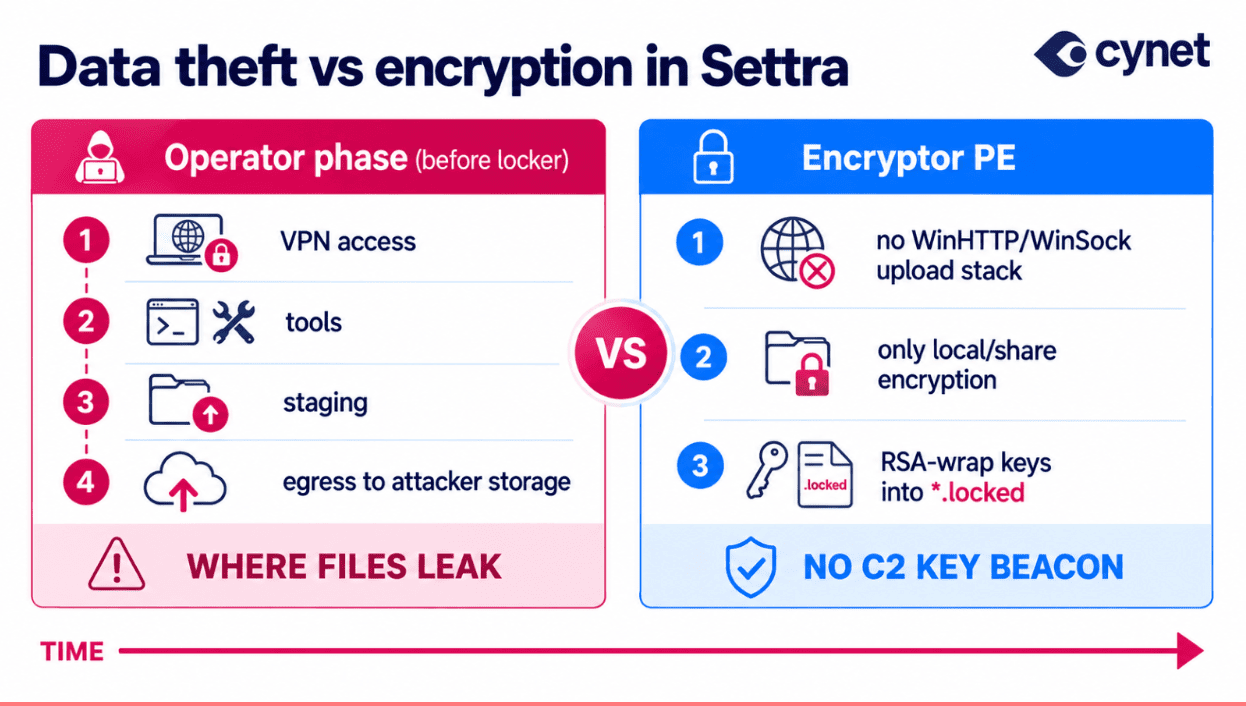
Figure 9: Settra Hybrid Cryptography Model: Per-File Ephemeral Keys Wrapped with Hardcoded 4096-bit RSA Public Key
Modern threat actors engineer their payloads specifically to bypass traditional signature scanners. Settra arrives unsigned, wrapped in a custom AES-CTR crypter, and will not execute without an operator password.
Cynet’s multi-layered defense architecture stops this ransomware variant instantly—preventing encryption entirely in Block Mode, and generating deep, multi-stage forensic telemetry in Detection Mode.
1. Proactive Block Mode: Zero-Day Neutralization
In Block Mode, Cynet eliminates the threat before a single victim file is compromised. Rather than waiting for known file hashes, Cynet employs kernel-mode driver monitoring combined with intelligent Decoy File (Honeypot) Deception.

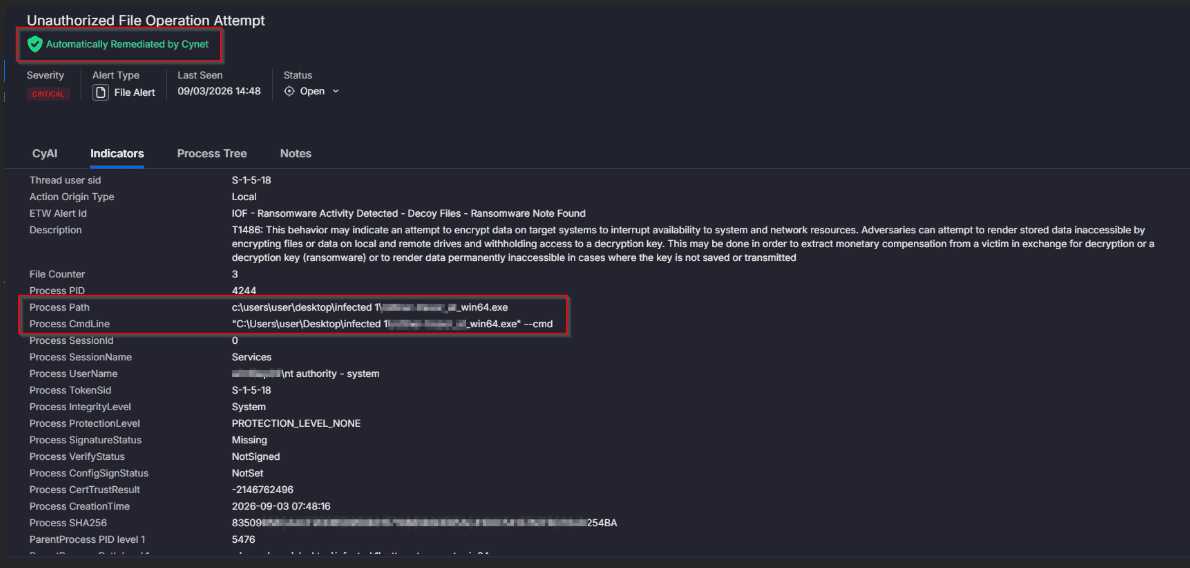
Figure 10: Cynet Proactive Block Mode: (Top) Critical Automated Remediation Banner; (Bottom) Intercepted File Operation Attempt with 1-Second Process Kill
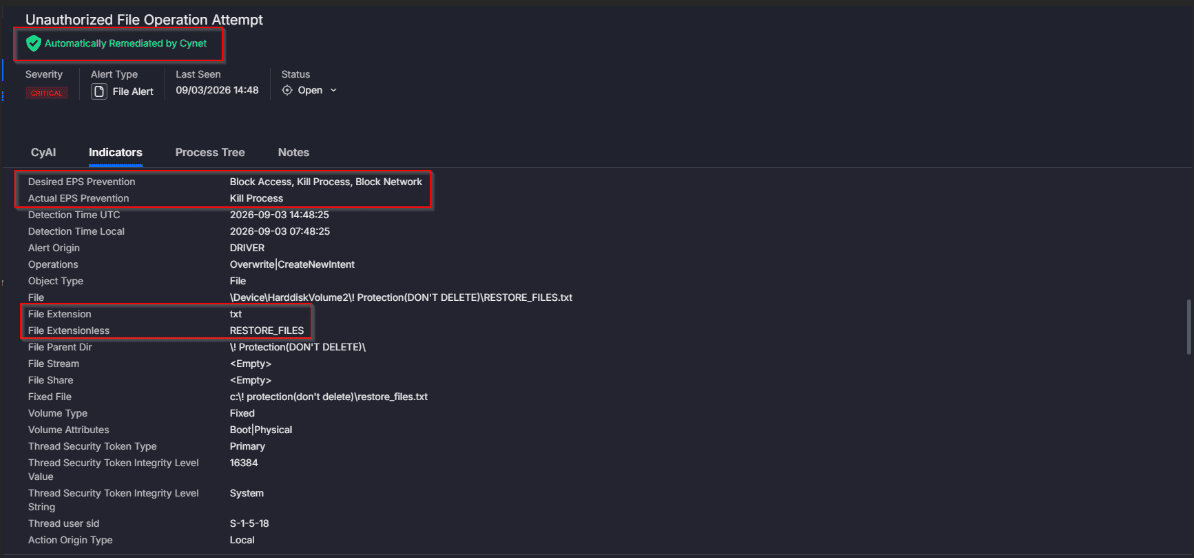
Figure 11: Cynet Kernel Driver Interception: Kill Process Executed on Unauthorized Attempt to Touch Decoy Honeypot Directory (! Protection)
2. Detection Mode: Comprehensive Threat Telemetry
When operated in audit or Detection Mode, Cynet allows the execution to proceed while capturing forensic evidence across every stage of the kill chain:
Alert 1: Process Monitoring — Disabling Event Logging
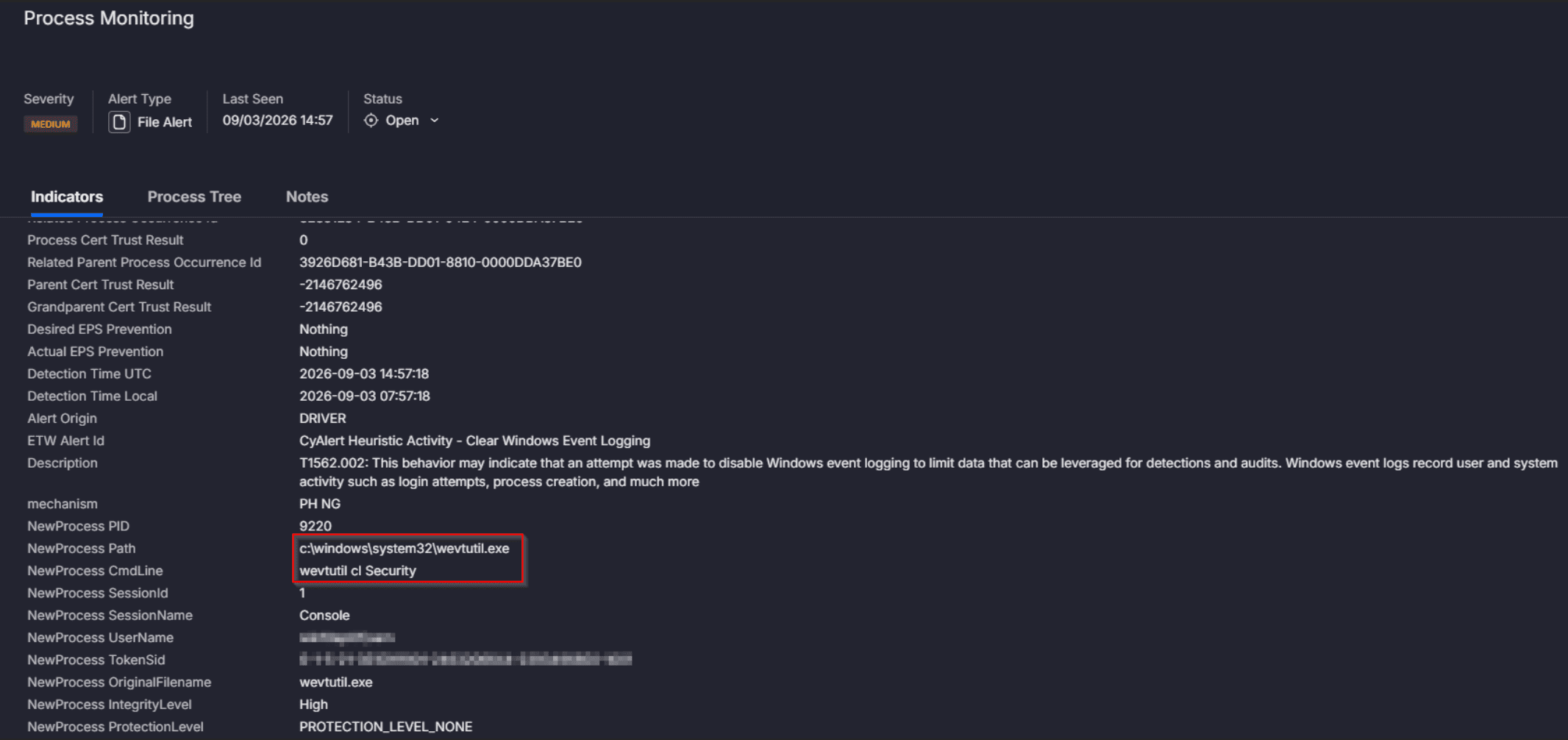
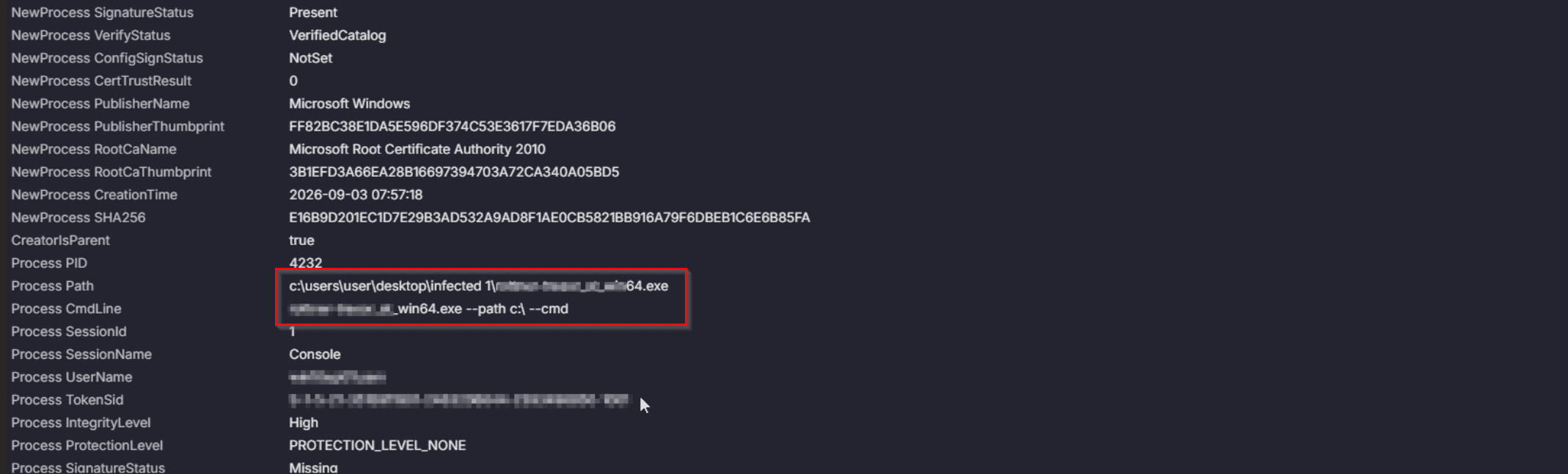
Figure 12: Cynet Detection Mode — Defense Impairment: (Top) CyAlert Heuristic Detection for Clear Windows Event Logging; (Bottom) Command-Line Process Trace (wevtutil.exe cl Security)
Alert 2: Unauthorized File Operation — Ransomware Overwrite Activity
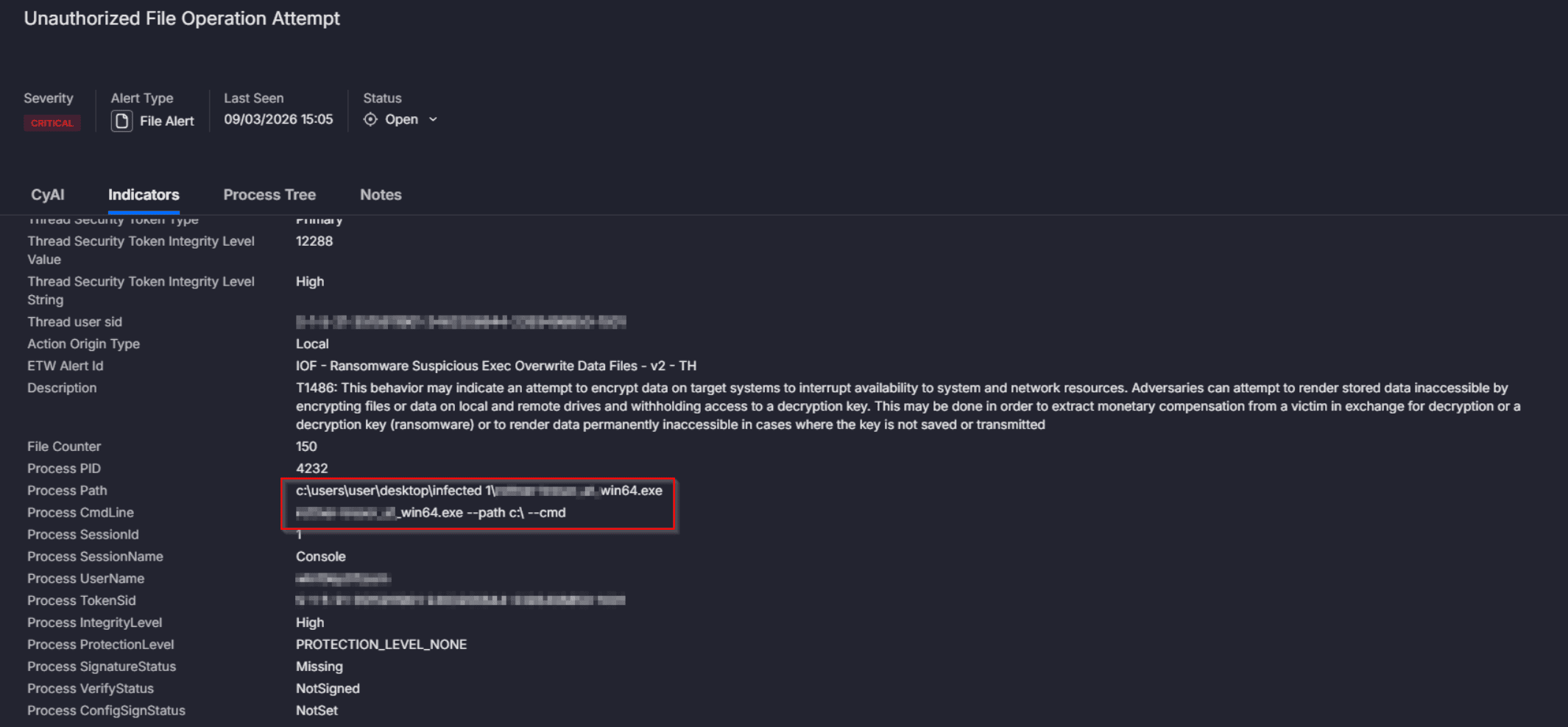
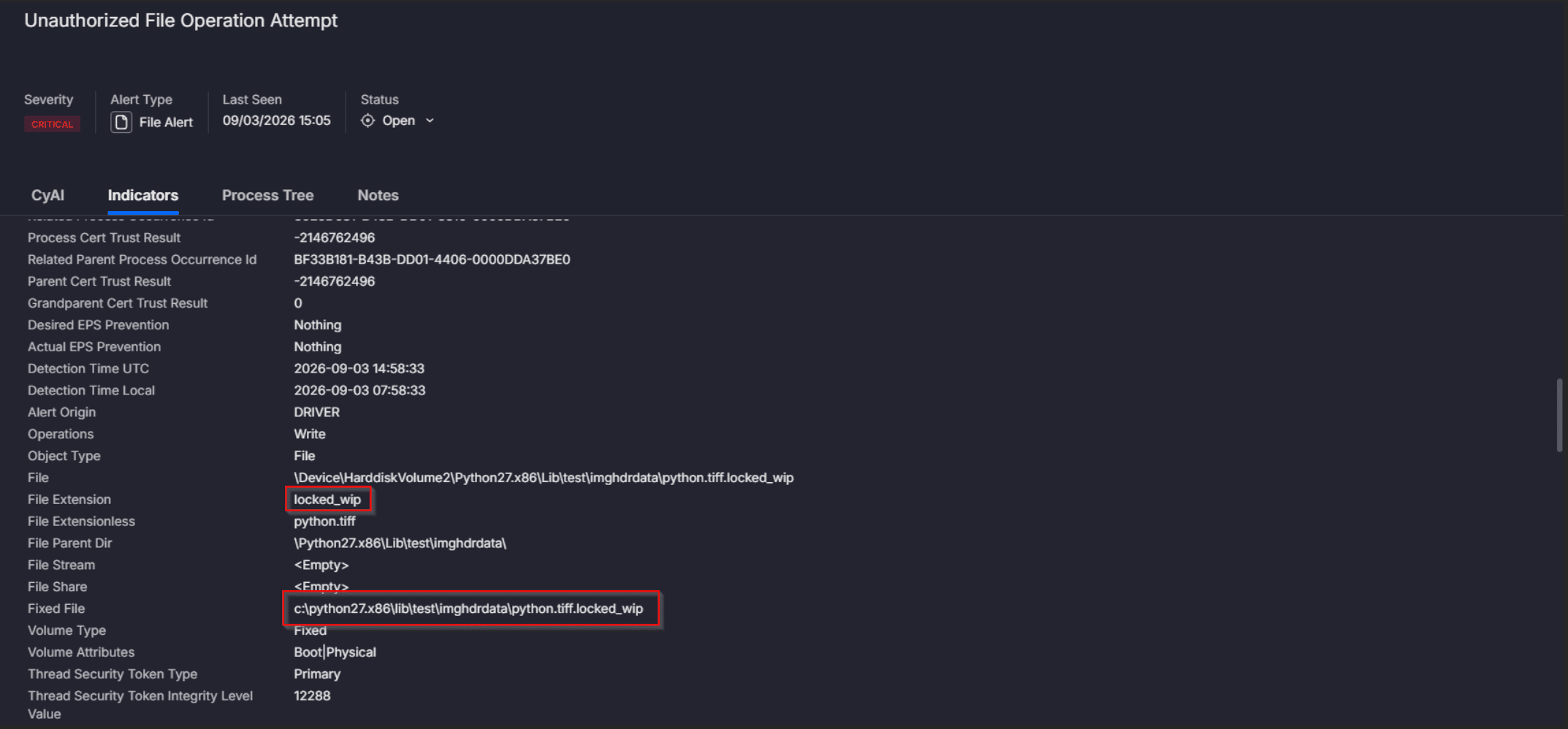
Figure 13: Cynet Detection Mode — Mass Overwrite: (Top) IOF Alert for Suspicious Executable Overwriting Data Files; (Bottom) File Indicators Showing Rapid .locked_wip Extension Generation
Alert 3: Unauthorized File Operation — Ransomware Note Found
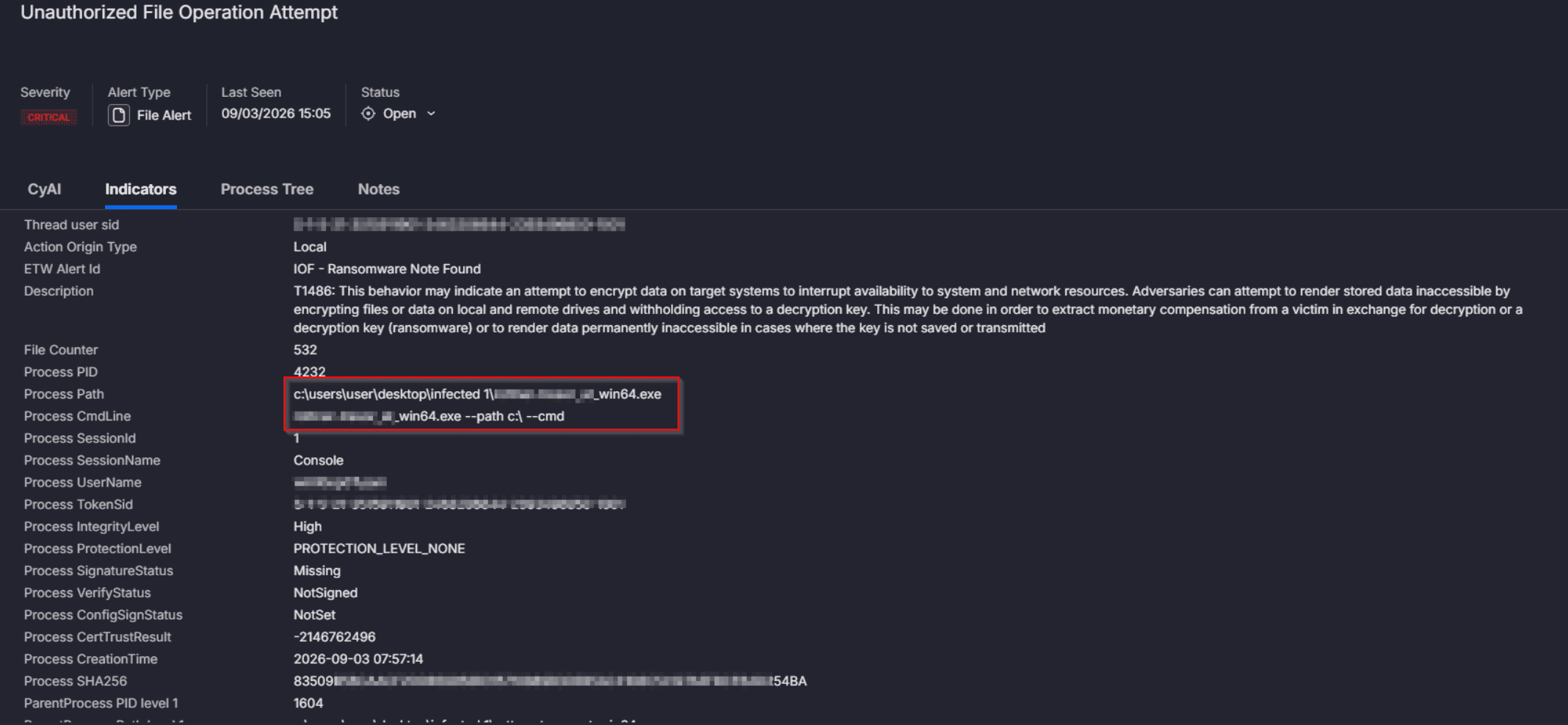
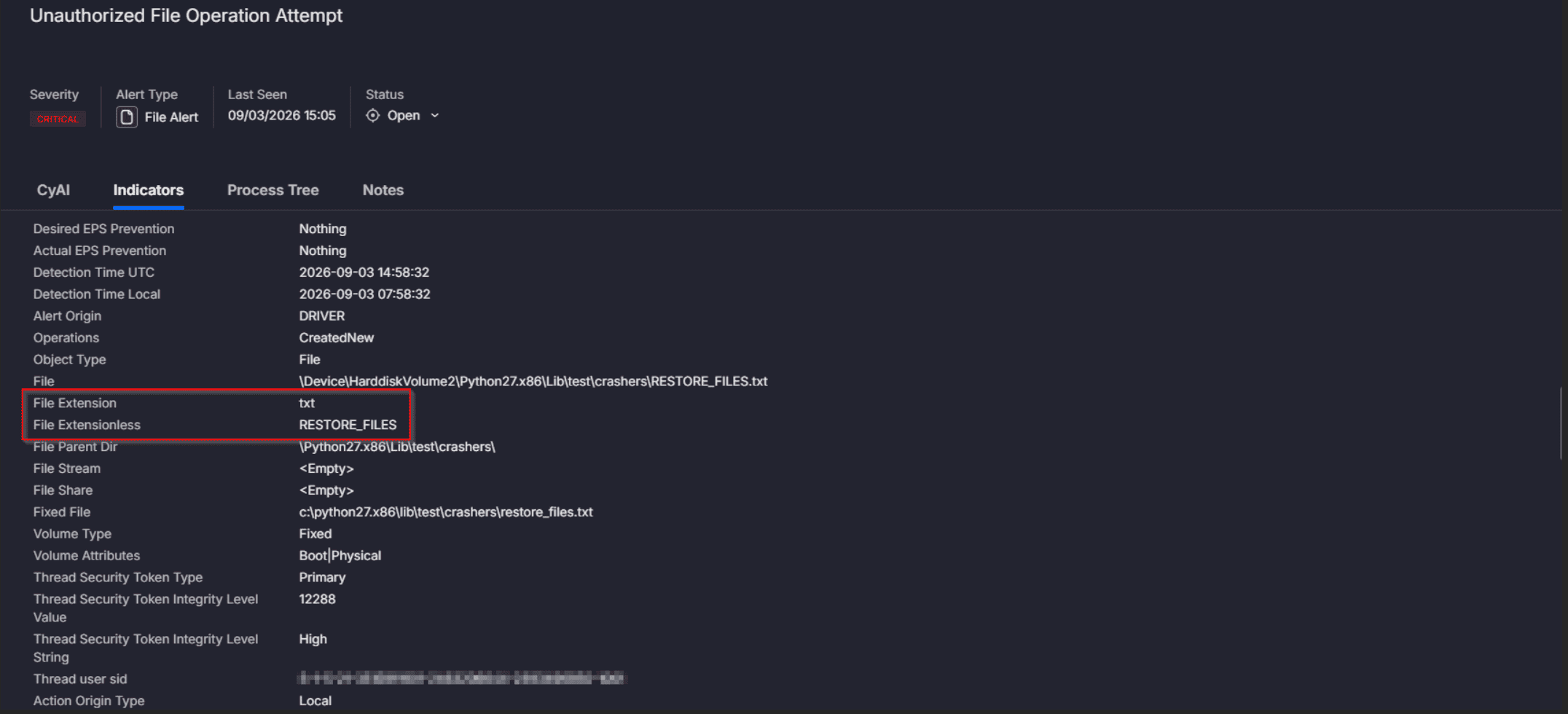
Figure 14: Cynet Detection Mode — Ransom Note Drop: (Top) IOF Alert for Ransom Note Creation (532 Files Affected); (Bottom) File Indicators Tracking RESTORE_FILES.txt Across Directories
Alert 4: Unauthorized File Operation — Decoy Files Touched
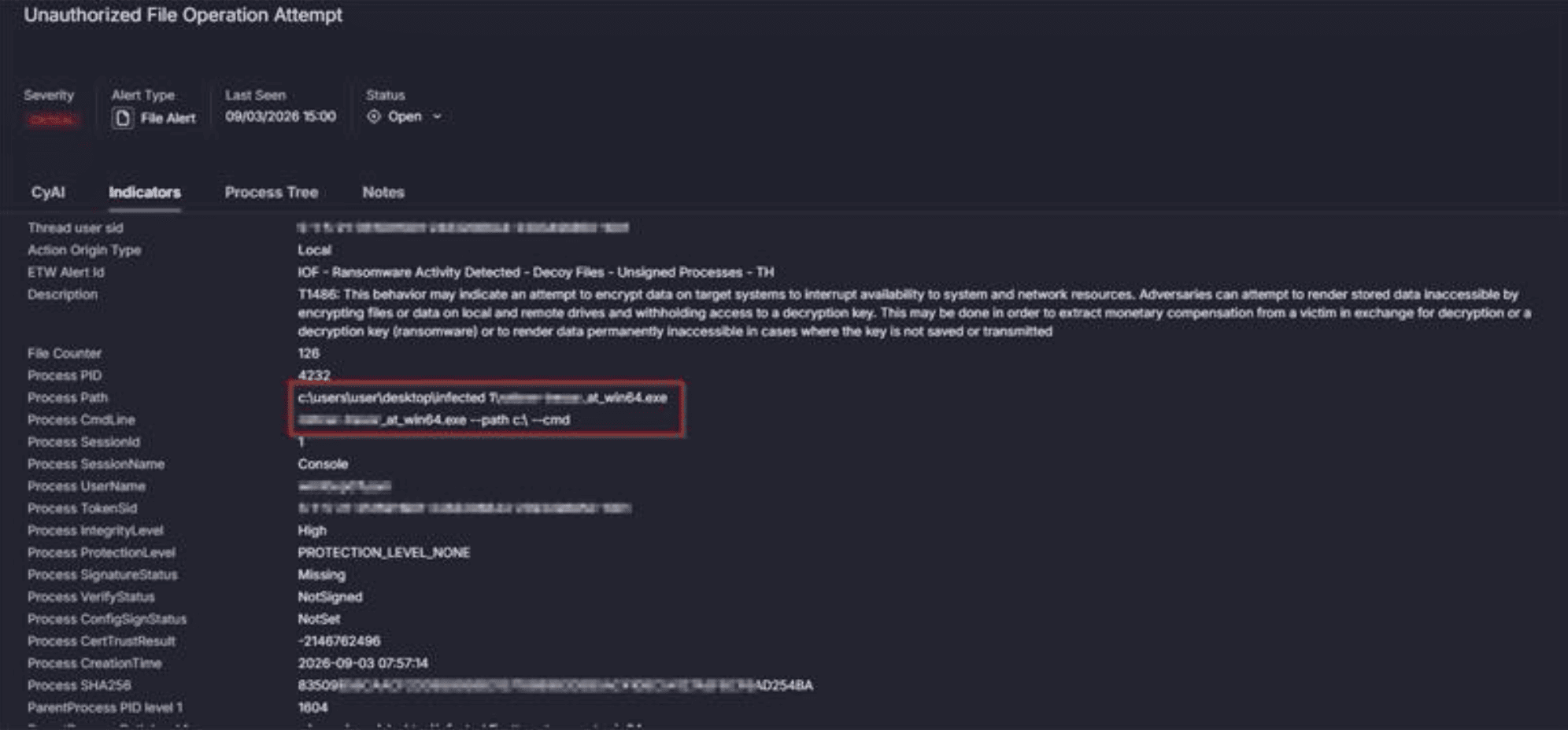
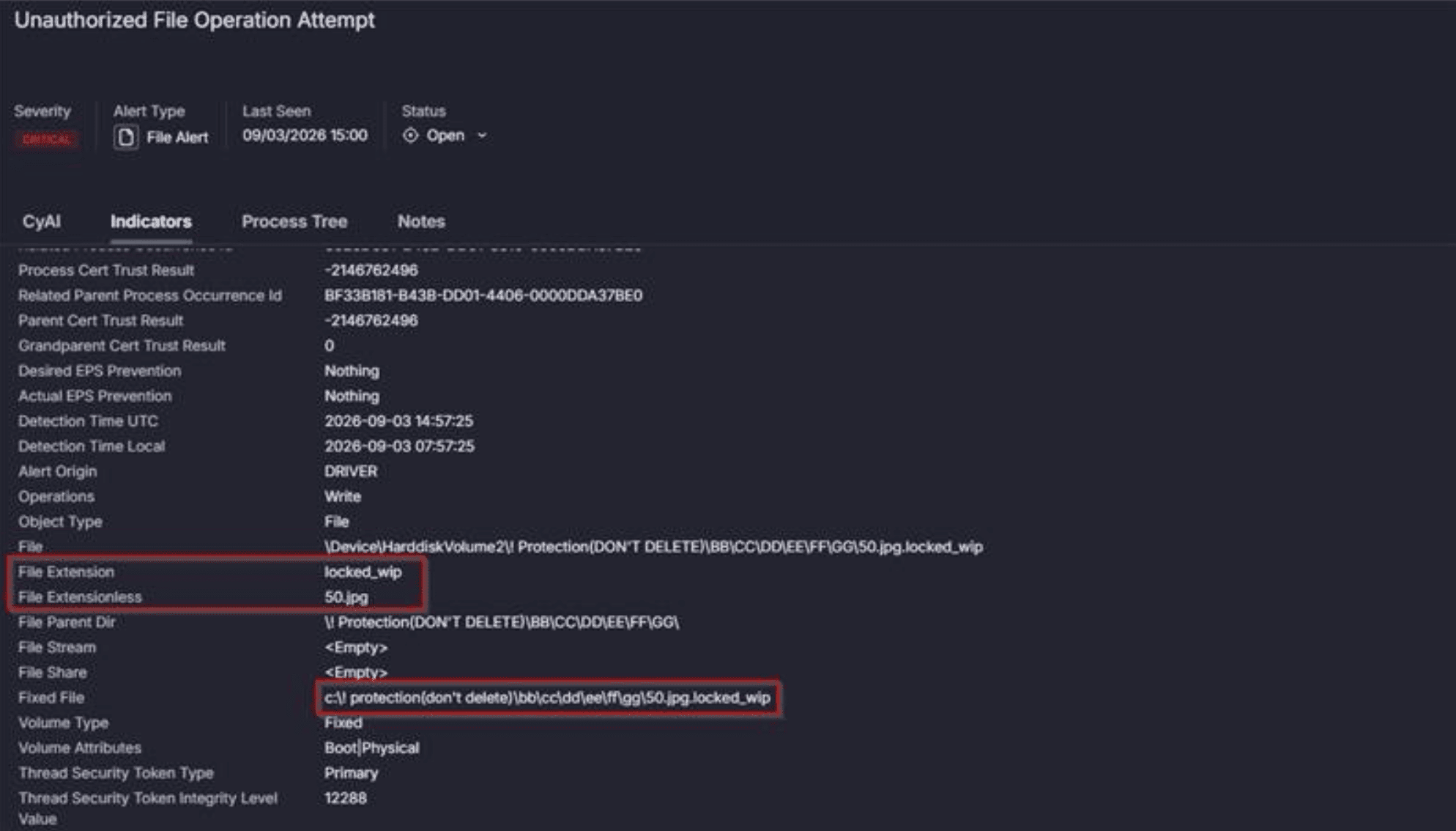
Figure 15: Cynet Detection Mode — Deception Telemetry: (Top) IOF Decoy Files Alert for Unsigned Process; (Bottom) Target Path Trace in Honeypot Protection Directory (50.jpg.locked_wip)
3. Laboratory Execution Trace
To confirm the static reverse engineering findings against live execution telemetry, Settra was detonated in an isolated FLARE analysis VM running Cynet monitoring:
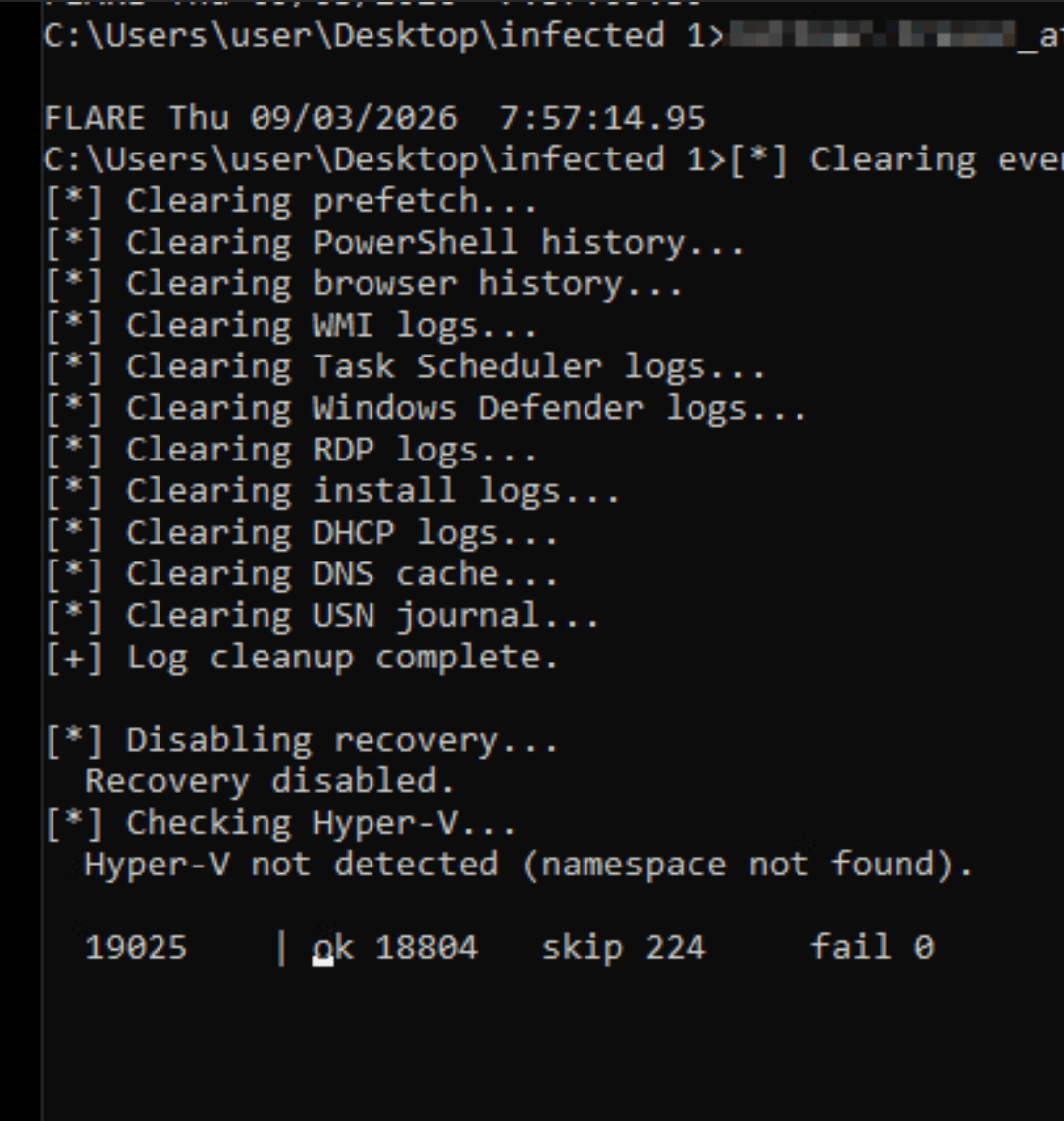
Figure 16: Live Malware Execution Output in Research Lab: Step-by-Step Validation of Log Wiping, Recovery Disablement, Hyper-V Query, and Real-Time Encryption Progress
The console output provides empirical validation of every mechanism identified in our static analysis:
| ID | Tactic | Technique | Description |
|---|---|---|---|
| T1078 | Initial Access | Valid Accounts | Compromised VPN and domain credentials |
| T1588.002 | Resource Development | Vulnerable Signed Driver | BYOVD staging of STProcessMonitor_v114.sys |
| T1068 | Privilege Escalation | Exploitation for Privilege Escalation | Ring-0 driver exploitation to elevate primitives |
| T1562.001 | Defense Evasion | Impair Defenses: Disable Tools | Terminating security processes and services |
| T1562.002 | Defense Evasion | Impair Defenses: Disable Windows Event Logging | 12-target wevtutil cl log wiping |
| T1070.004 | Defense Evasion | Indicator Removal: File Deletion | Deleting Prefetch, USN journal, and PowerShell history |
| T1027 | Defense Evasion | Obfuscated Files or Information | API hashing, per-string XOR, AES-256-CTR packed payload |
| T1140 | Defense Evasion | Deobfuscate/Decode Files or Information | In-memory stub decompression (LP77) |
| T1055.012 | Defense Evasion | Process Hollowing | Spawning suspended child, unmapping, and remapping inner PE |
| T1003 | Credential Access | OS Credential Dumping | LSASS memory extraction during pre-encryption phase |
| T1047 | Execution | Windows Management Instrumentation | Querying Hyper-V namespace and disabling VMs |
| T1021 | Lateral Movement | Remote Services | Lateral spread via PAExec and NetExec |
| T1083 | Discovery | File and Directory Discovery | Local volume and network share enumeration |
| T1486 | Impact | Data Encrypted for Impact | CNG hybrid encryption (.locked / .locked_wip) |
| T1490 | Impact | Inhibit System Recovery | reagentc /disable, wbadmin, vssadmin shadow storage shrink |
| T1529 | Impact | System Shutdown/Reboot | Powering off Hyper-V guests via WMI |
| Category | Indicator | Details |
|---|---|---|
| Behavioral CLI | win64.exe –pass <secret> –cmd –path <dir> | Command-line unlock and execution contract |
| File Artifact | C:\Users\Public\NOTICE.png | Extracted desktop notice wallpaper |
| File Artifact | RESTORE_FILES.txt, RESTORE_FILES.html | Dropped ransom note files |
| File Extension | *.locked, *.locked_wip | Final and intermediate encrypted file extensions |
| BYOVD Driver | STProcessMonitor_v114.sys / STProcessMonitor.sys | Safetica DLP signed vulnerable driver |
| Extortion Infra | settra5…onion | Tor leak site and negotiation chat portal |
Prepared by Cynet Research Labs. Static analysis and telemetry validation conducted September 2026.



Search results for: