

Shadow AI and compromised identities rarely show up as isolated problems. They are steps in an attack path, and knowing one needs attention is only the start. Your team still has to work out who is involved, what happened, and what to do next, often across more than one client environment. Cynet offers new AI Security and enhanced Identity Security experiences from within the unified console you already use.
The value is not another dashboard to check. It is a clearer starting point for the conversations and investigations your team already needs to have: which AI tools are people using, which users need a closer look, and where should we focus next?
Start With a Simple Question: Which AI Tools Are We Actually Using?
Before you can have a useful conversation about AI policy, you need to know what is in use. New AI Security capabilities available in Beta, bring visibility into shadow AI applications, agents, and GenAI services to the existing Cynet agent and console. It covers browser access to public AI services and supported Windows endpoint activity, connecting usage to the user, device, process, and source. This gives security teams somewhere concrete to start, rather than asking people to remember every tool they have tried.
From there, you can review usage, investigate adoption patterns, and set an approval state for each AI app or service. Access is controlled through View and Manage AI Security permissions, and approval changes are recorded in the Audit Log. The point is to make the next conversation more useful: here is what we see, here is what is approved, and here is where we need to follow up.
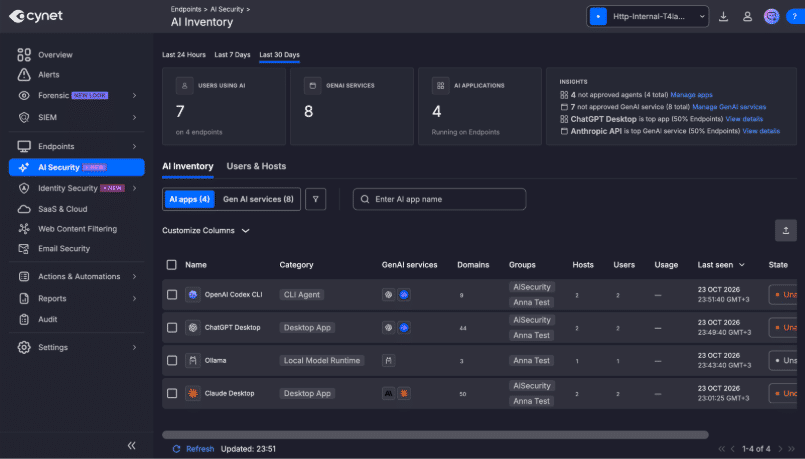
AI Inventory Visibility in Cynet AI Security – Beta
For MSPs, that creates a practical way to talk with customers about AI adoption. Per-site and cross-site views help you review usage across the environments you manage, while exports give you something tangible to bring into a customer review. For security teams, the same information can help turn a broad concern about shadow AI into a focused discussion about specific tools and users.
There is an important distinction here: marking a tool as approved or unapproved does not automatically block it. The new AI Security features focus on visibility and approval workflows, not complete AI governance. Cynet’s existing AI Chatbots category in Web Access Control separately supports allowing or blocking AI chat domains. Knowing what is in use and deciding how access should be managed are related steps, but they are not the same capability.
An Identity Alert Should Be the Start of an Answer, Not Another Search
When a user needs attention, the next question is why. The new Identity Security experience, in Beta, brings identity risk signals, authentication activity, ITDR alerts, and user context into one view. Instead of looking at an alert on its own, your team can investigate the user behind it and understand the activity that led to the concern.
Cynet’s ITDR capabilities connect Microsoft 365, Entra ID, Active Directory, and VPN login activity with endpoint and network telemetry. For a security team, that means more evidence is available in the same workflow. For an MSP, it gives customer conversations a clearer foundation: not just that an identity needs attention, but the context behind it and the next step to consider.
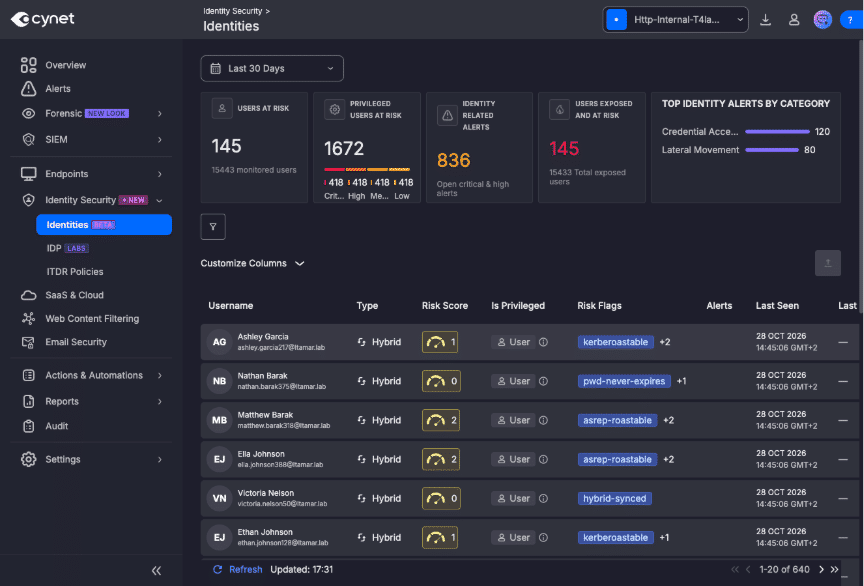
New Dedicated Identities page in Cynet Identity Security – Beta
Make the Next Step Easier to See
Context is useful when it helps you decide what to do. Guided identity investigations bring recommendations and remediation actions into the workflow, with CyOps, Cynet’s 24×7 MDR security experts, behind the platform. Existing ITDR response capabilities include disabling compromised AD or Microsoft 365 users and isolating endpoints through ProActive CyOps. The new Beta view builds on those established capabilities rather than asking your team to start over.
There are smaller, practical improvements here too: more context for downloaded files and AI-generated allow-list recommendations. For security teams and MSPs, the benefit is a better-informed investigation and a clearer basis for tuning the environment—not simply more information to sift through.
More Context. A Clearer Next Move.
Said differently, if you can’t see it – you can’t protect it. These new capabilities enable you to see which AI tools are in use and understand why an identity needs attention. This brings the evidence into the workflow where you can act and make the work of managing multiple environments less repetitive. For security teams, it is a clearer starting point for investigation. For MSPs, it’s a concrete way to help customers understand what is happening in their environment and what to consider next.
Want to see what that looks like in your environment? Request access to the Cynet V5.1 Beta Program, or take a tour of the new AI Security Beta experience: https://tour.cynet.com/psl/AI-Security