

The question every IT and security leader is asking right now isn’t “are we protected?” It’s “How do we protect more without burning out the team we already have?”
Cynet v4.33 is the answer. This release delivers across three critical security dimensions — Scale, Speed, and Interoperability — with major advances for IT and security teams who need to do more with the resources they already have. For MSPs, that means purpose-built account-level management that lets one analyst protect many clients without sacrificing visibility or control. For IT and security teams, it means self-service proactive response, unified SIEM, and faster investigation workflows. Across both audiences, the through-line is the same: less friction, less manual work, more time for what matters.
The result is a platform that scales with your team. Giving you unified visibility across the entire environment, faster investigation workflows, automated identity response, and deep integration with the operational tools you already depend on.
What’s New in Cynet v4.33
Scale: One Team, Every Environment
The biggest operational challenge for IT and security teams today isn’t identifying threats; it’s managing response across multiple environments without an unlimited team behind you. With Cynet v4.33, that challenge gets significantly smaller.
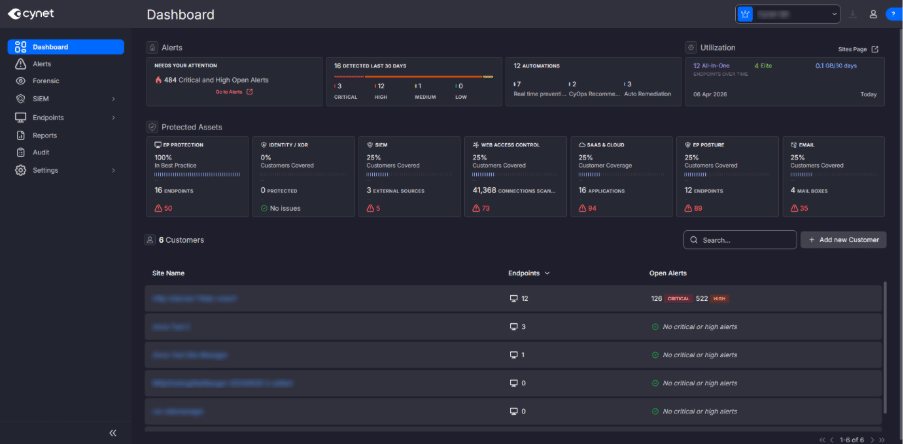
Cross-Site Dashboard- NEW (Beta) is the redesigned security intelligence center for teams managing multiple environments. For the first time, you get a single account-level command center that shows every managed environment’s alert status, utilization, and protected-asset health without leaving the page. High and critical alerts across your entire scope of responsibility are surfaced immediately. Asset protection metrics (endpoints, XDR/ITDR coverage, SIEM, Web Access Control, Email Security, SaaS & Cloud integrations) are visible at a glance with one-click drill-down into any site that needs attention.
SOC analysts, service managers, and IT teams each get the view they need from one screen.
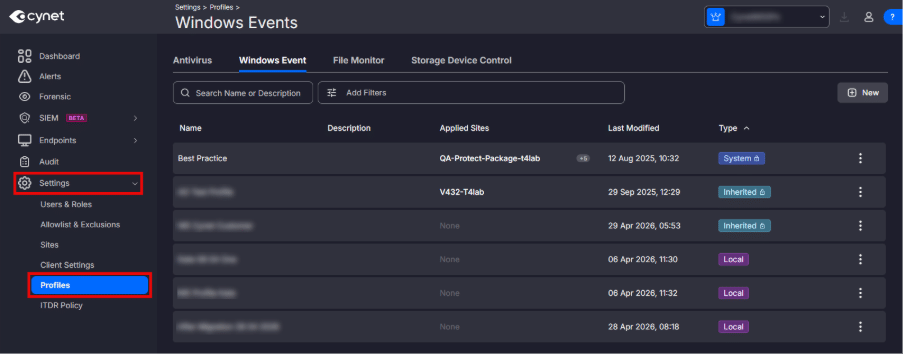
Cross-Site Profile Management (gradual rollout) takes the same principle as configuration. Antivirus, File Monitoring, Storage Device Control, and Windows Events profiles can now be defined once at the account level and inherited down to every site. Profiles are clearly categorized as System, Inherited, or Local, so scope, origin, and audit trail are always explicit. Configure once, apply everywhere. No more recreating the same settings tenant by tenant.
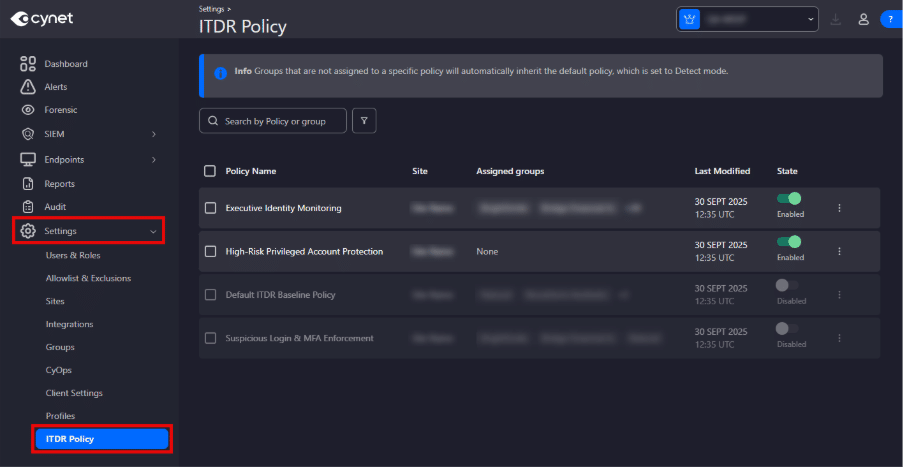
ITDR Policy Management by Group allows IT and security teams can now visualize and manage every ITDR policy across every environment, including operational mode and group assignment. Apply identity-threat policy uniformly or differentiate by environment tier.
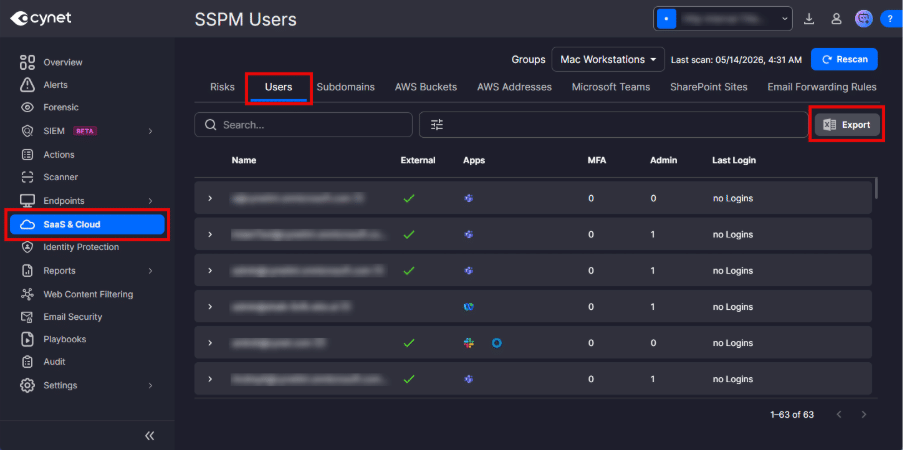
SSPM User Export rounds out the “Scale” pillar by letting you export SSPM user data from the SaaS & Cloud page to CSV, giving you a portable record of user access and permissions across connected SaaS environments for compliance reviews, audits, and client reporting without any screen-scraping.
Speed: Faster Detection, Faster Response
Security analysts win or lose on minutes. v4.33 cuts time-to-triage and time-to-remediation across the alert lifecycle.
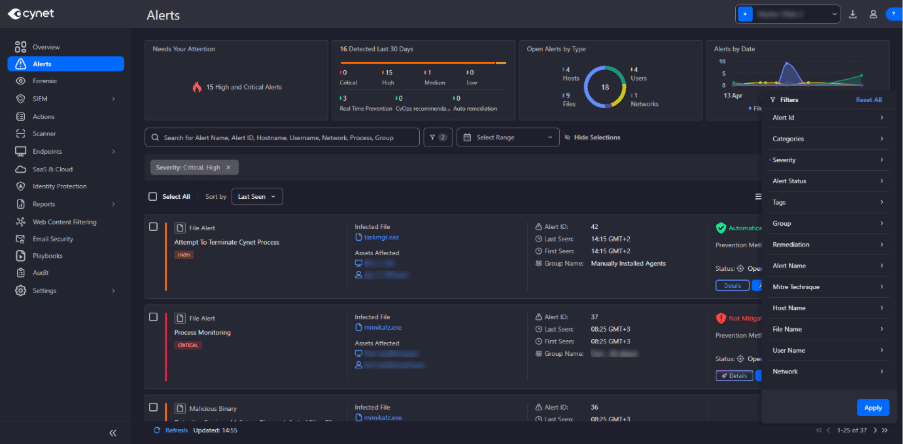
To further accelerate defenders, the Alerts experience has been completely redesigned. Key metrics are now positioned at the top of the page where they belong. Alert volume, severity distribution, alert types, and recent detection activity are visible the moment you open the page. The former Alert Description section has been renamed Alert Indicators and reorganized for clarity. A new alert explanation field adds context to every alert, so analysts understand what they’re looking at before they dig in.
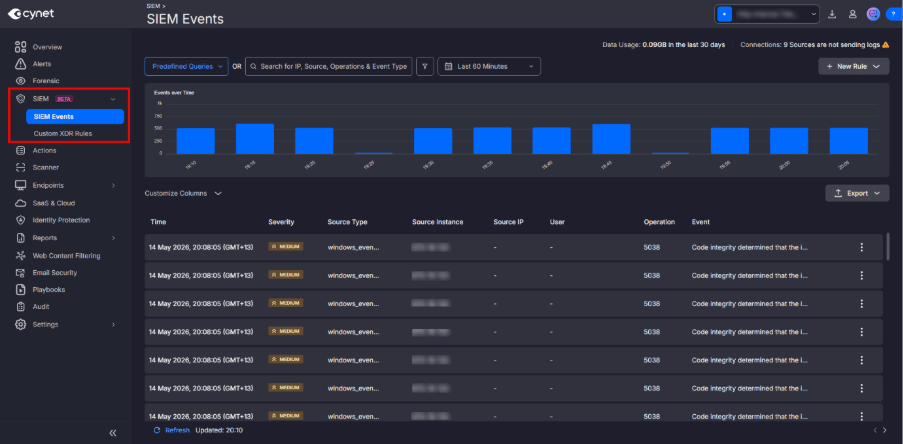
SIEM Essentials (Beta) introduces foundational SIEM capabilities like monitoring, investigation, and custom XDR rule management into a single navigation section at both the Account and Site level. Predefined starter queries accelerate investigations from the moment you open a case. Customizable event table views let teams tailor the experience to their workflow. Teams gain improved visibility into SIEM ingestion allocation across environments, making resource management easier. Our goal is to deliver SIEM capabilities exactly where your analysts already work, not in a separate tool.
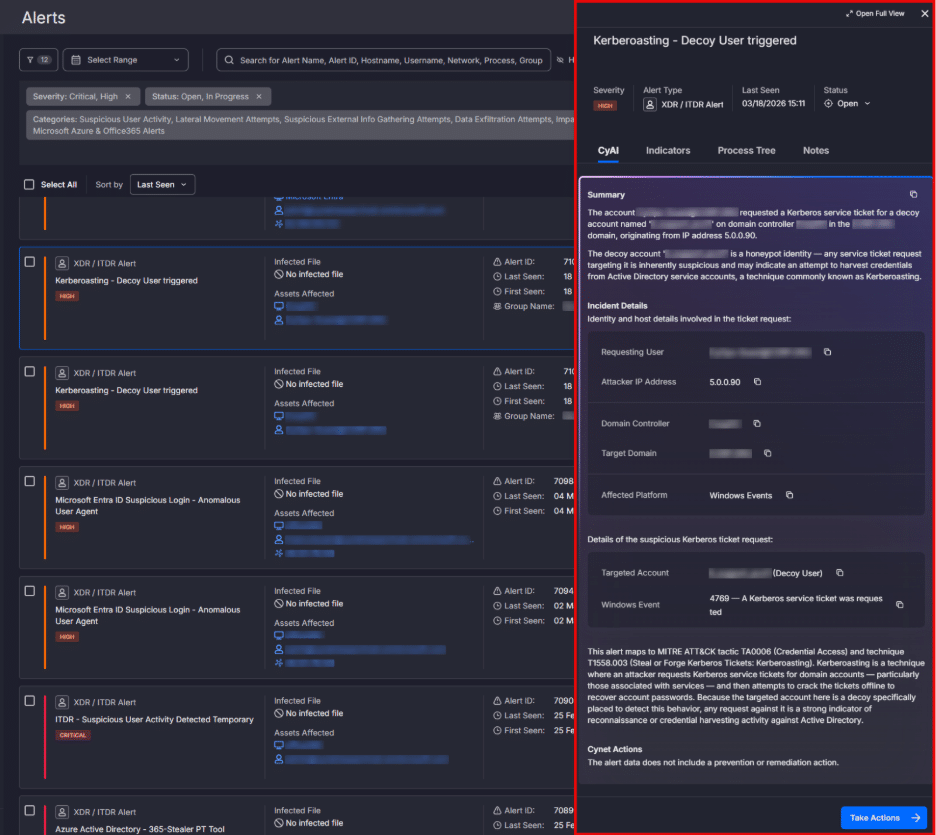
CyAI XDR and ITDR alert explanations help security and IT teams quickly understand complex detections across a wide range of providers, data sources, alert types, and security domains. Instead of applying generic AI summaries to highly varied alerts, CyAI uses specialized, context-aware agents that apply provider-specific, activity-specific, and domain-specific knowledge to each case. The result is clear, actionable intelligence that explains what happened, why the activity may be suspicious, which entities are involved, and where analysts should focus next across identity, endpoint, network, cloud, and file-based detections.
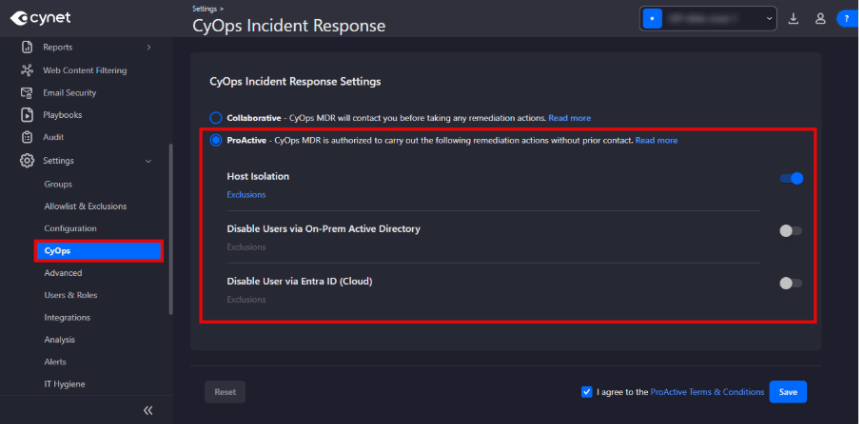
Proactive CyOps Incident Response is now available directly within the console. Activate 24×7 expert response directly and immediately. Select which remediation actions CyOps should take proactively, exclude specific hosts or users if needed, and CyOps operates within the policy you define. Faster enablement means faster protection.
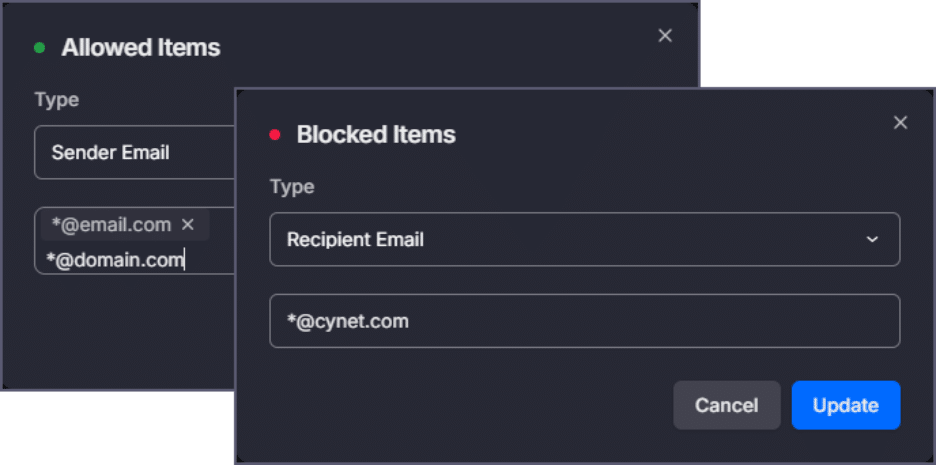
Email Security gets two meaningful upgrades. Expanded Sender Allow/Block Rules now support wildcard email patterns, domains, subdomains, and top-level domains with a deterministic priority hierarchy (more specific rules take precedence; block overrides allow at equal specificity) and full rule-decision logging for visibility into every enforcement action. And recursive attachment scanning now analyzes nested .eml attachments as independent messages, scanning multi-layer email chains up to three levels deep. Attackers increasingly use forwarded and wrapped email structures to hide malicious payloads. That technique no longer works.
Interoperability: Security Embedded in Daily Operations
Security tools that sit outside your team’s daily workflow don’t last. Cynet v4.33 plugs directly into the systems they already use, so security becomes part of how work gets done, not something separate from it.
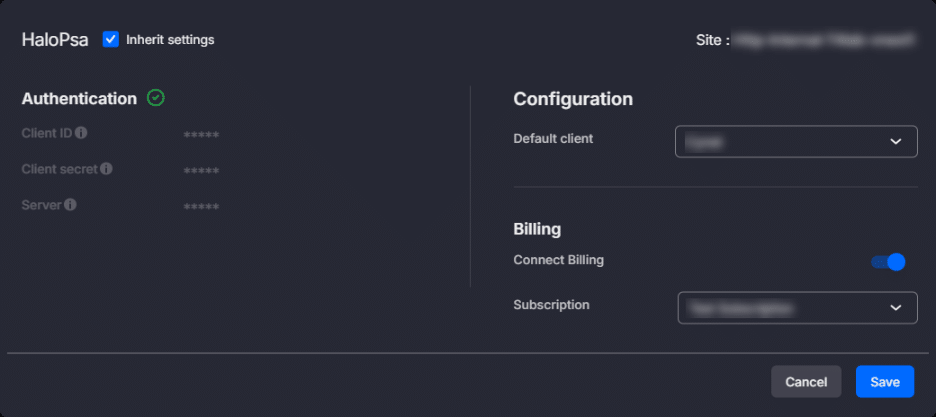
HaloPSA Billing Automation eliminates one of the most time-consuming recurring tasks in managed service operations: monthly billing reconciliation. Cynet now calculates endpoint consumption per site and automatically syncs that data to your mapped HaloPSA subscriptions once a month. What used to take hours per billing cycle now happens automatically. Configuration is flexible at both the account and site level.
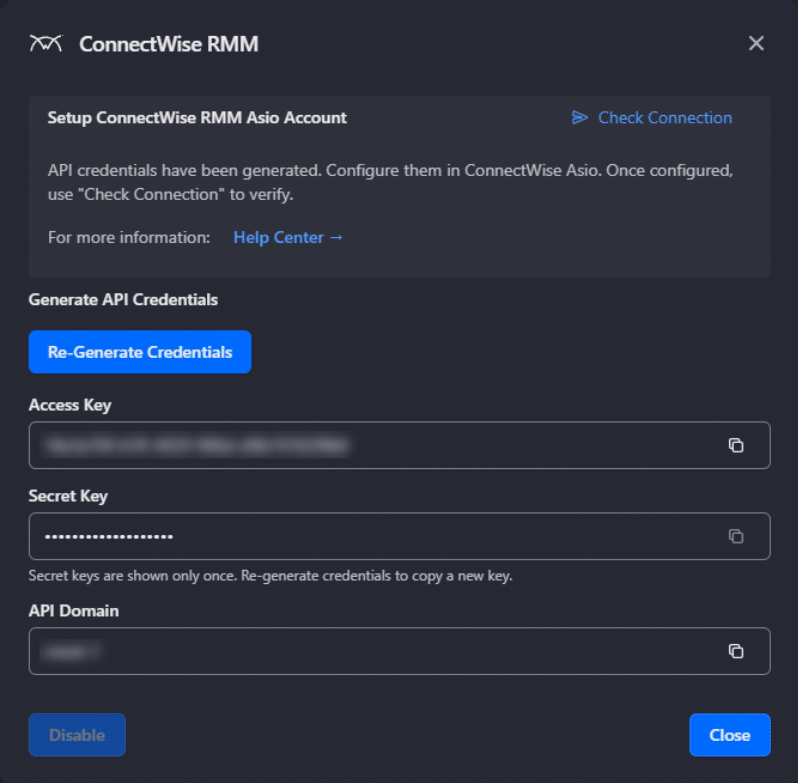
The ConnectWise RMM Integration brings Cynet agent deployment and monitoring directly inside the ConnectWise platform. Map Cynet Sites to customer environments, deploy agents through ConnectWise automation workflows and policies, and monitor agent health and installation status without leaving your RMM. Automated deployment policies can detect if devices are missing Cynet protection and deploy the agent automatically — providing consistent coverage across every managed environment, at scale.
The Generic Alert Webhook Integration enables flexible alert routing to any downstream tool or workflow. Configure multiple webhooks at the tenant or group level, and every new alert is automatically delivered as a JSON payload to your designated endpoint. This makes it straightforward to wire Cynet into Teams, Slack, ticketing systems, or any automation platform your team already uses.
Custom remediations get two meaningful updates to streamline patch management and software maintenance. Windows patch custom remediation allows for the installation of specific windows updates on a managed host. Software update custom remediation allows specific applications to be upgraded on a managed Windows host.
Finally, consistent time zone display is now enforced across all console views. Tables, dashboards, event views, and alert details all reflect the time zone configured for each site. A small change that makes a real difference when analysts and users are comparing timestamps across a case.
Why It Matters
The talent gap isn’t coming. It’s here. IT and security teams are being asked to protect more with the same headcount. The tools built for large enterprise security operations don’t close that gap for the organizations that need it most.
Cynet v4.33 was built for this moment. Every capability in this release is designed to answer one question: how does one team protect every environment they’re responsible for, without trading speed for scale?
The answer is a platform that delivers:
- Complete visibility across the environment from a single screen
- Unified identity threat detection and automated response
- Security workflows embedded in the operational tools your team already uses
- Faster investigation with less manual triage
- Consistent configurations applied once and inherited everywhere
Ready to See It in Action?
Visit our Release Notes for the full details, take our interactive tour, or reach out to your Cynet team to explore what’s new in your environment.