

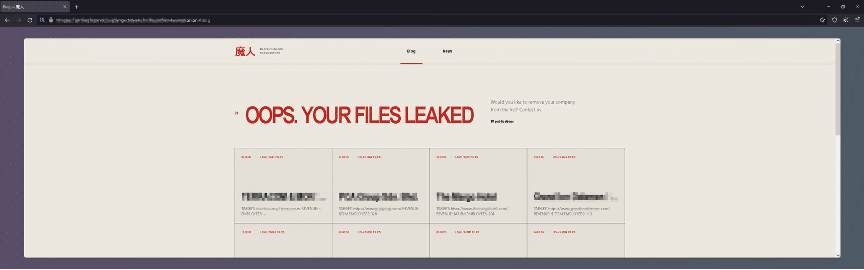
Majinahanashi surfaced publicly in August 2026, the latest in a string of Japanese-branded ransomware operations this year alongside Yurei, Sinobi, and Tengu. The name is the group’s own joke: majin means demon or djinn, hanashi means story. Its leak site carries the characters 魔人 in red above the headline “OOPS. YOUR FILES LEAKED.”
The branding is theater. The code underneath is serious engineering, and most of it is aimed at two goals: encrypting fast and staying invisible to the tools meant to stop it.
Here’s what the CyOps team found when it took the sample apart for the September 2026 CTI Report.
Who It Hits, and Who It Doesn’t
Public trackers list between 15 and 22 published victims across Italy, France, Spain, Germany, Switzerland, Greece, Portugal, and countries in Asia and Latin America. They’re mostly mid-market retailers, manufacturers, hotels, jewelers, and food producers averaging about $25 million in annual revenue. One reported ransom demand was $15,000. This is a volume business. Brinztech has tracked the same focus on hospitality and mid-sized companies.
Two avoidance patterns sit at different layers. The binary checks the host’s locale and exits without encrypting on machines in Commonwealth of Independent States countries, the standard safeguard of Russian-speaking operations. Separately, no published victim is in the United States, the UK, Canada, or Australia. One is a guard compiled into the code. The other is a choice made by whoever picks the targets. The Japanese branding points to neither.
Almost Nothing Visible to a Scanner
The sample is a 64-bit Windows executable built on July 2, 2026, weeks before the first victims appeared. Its import table lists only 27 functions, and not one opens, reads, writes, or encrypts a file. The real capability, about 200 functions across 14 libraries, gets resolved at runtime.
It goes further for the operations endpoint tools watch most closely. Reading, writing, and closing files skip the Windows API entirely through direct system calls, removing the three functions EDR monitors most reliably from view.
It’s also a debug build. Full logging was left in, so the malware narrates every stage of its own attack in plain English. Seventeen command-line switches turn it into an operator console, including –dry-run and –discover for surveying a network before committing, –spread for propagation, and three development switches nobody removed before shipping.
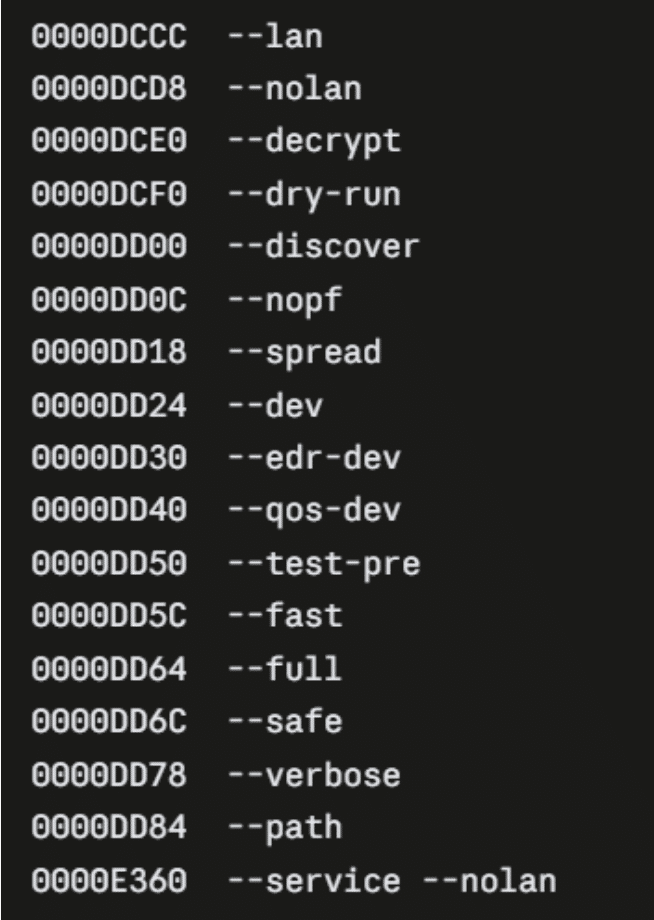
Majinahanashi’s 17 operator command-line switches, including development flags left in the shipped build.
Tuning Windows for Faster Encryption
Before destroying the system, Majinahanashi optimizes it. It raises the number of concurrent SMB operations the host accepts, keeps kernel code resident in memory, and biases memory toward file caching. Solid-state drives get split across parallel workers while spinning drives are queued one at a time. Large files are encrypted in stripes rather than end to end, which makes them unusable at a fraction of the work. Then it lowers its own disk priority to stay under the thresholds behavioral detection relies on.
Two Ways to Silence the Defender
The first approach is familiar: a list of more than 60 security process names to terminate, covering most of the endpoint market.
The second is quieter. Majinahanashi installs Windows Filtering Platform rules and Quality of Service policies that throttle selected applications down to nothing. The security agent keeps running and looks healthy on the host, but it can’t reach its cloud service. The same mechanism is turned on database engines and backup agents.
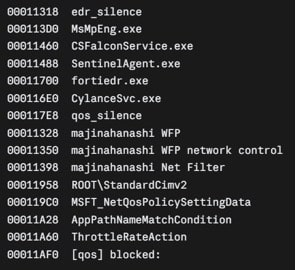
Strings showing EDR process targets alongside the WFP and QoS “silence” modules.
For defenders, those filter names are useful indicators. A filtering platform provider called “majinahanashi WFP” doesn’t belong on a healthy machine. It’s also why agent health checks shouldn’t stop at “the process is running.” Security tools themselves have become a regular target, as we saw with Chaotic Eclipse’s latest Microsoft Defender exploit. Cynet’s overview of defense evasion techniques covers more of the playbook.
Removing Every Path Back
Once launched, Majinahanashi spawns seven built-in Windows utilities directly, with no command shell in between, and runs ten commands. They delete shadow copies, disable the Windows Recovery Environment, turn off boot repair, switch off hibernation, clear the System, Security, and Application event logs, destroy the NTFS change journal, and disable System Restore. Then it runs the whole sequence a second time. The recovery-inhibition stage takes about 14 seconds.
Encryption uses AES-256 as a keystream, with each file’s key wrapped under an RSA-2048 public key inserted at build time. Every campaign build carries a different key, so recovering a sample never produces a decryptor. Encrypted files keep their original size and take the .majin extension. One small upside: because large files are encrypted in intervals, the skipped sections stay readable without any key.
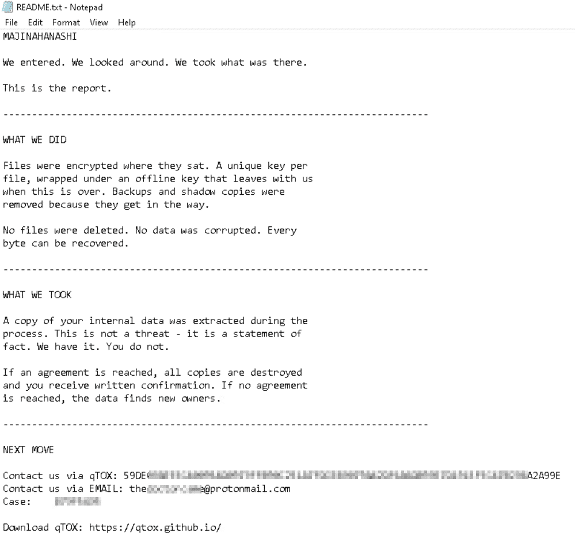
The Majinahanashi ransom note.
The Critical Detail
The ransom note says “A copy of your internal data was extracted.” The leak site backs that up, publishing victim archives thousands of files at a time in the victim’s own folder structure.
But the encryptor has no collection, staging, or exfiltration capability at all. That means the data theft happens separately, before the ransomware ever runs. By the time files start getting renamed to .majin, the attacker has already been in the network long enough to take what they wanted. Defenders who only watch for encryption are watching for the last step.
For more of the CyOps team’s recent ransomware research, see Inside Cynet’s Settra Ransomware Investigation and Tracking Doommageddon’s Ransomware Campaign.
How Cynet Detects Majinahanashi
With the Cynet platform set to detection-only mode so the full attack could run, Cynet flagged Majinahanashi at multiple stages:
- AV engine and SSDEEP hash inspection detected the malicious file on disk.
- Threat intelligence matched the binary against third-party CTI data.
- Process monitoring caught the recovery-inhibition commands, including vssadmin deleting shadow copies.
- Ransomware decoy files detected unauthorized modification attempts and suspicious extensions.
- Memory access monitoring caught attempts to access another running process’s memory.
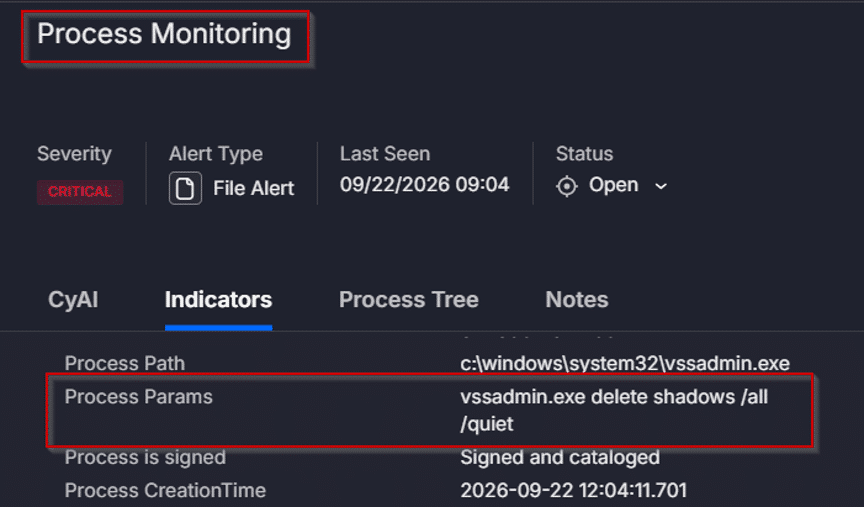
Cynet process monitoring alert on the shadow copy deletion command.
Get the Full Analysis
The September 2026 CTI Report includes the full static and dynamic analysis of Majinahanashi, its complete process tree and MITRE ATT&CK mapping, plus analysis of Kynix Stealer and Zawoo ransomware.